
Editing agents
The agent editor: prompt, tools, skills, subagents, model and tuning — and saving, duplicating, resetting and deleting agents.
- In the app
- AI Governance › Assistant › Agents
/ai/assistant - Needs any of
- ai_agents:viewai_agents:manage
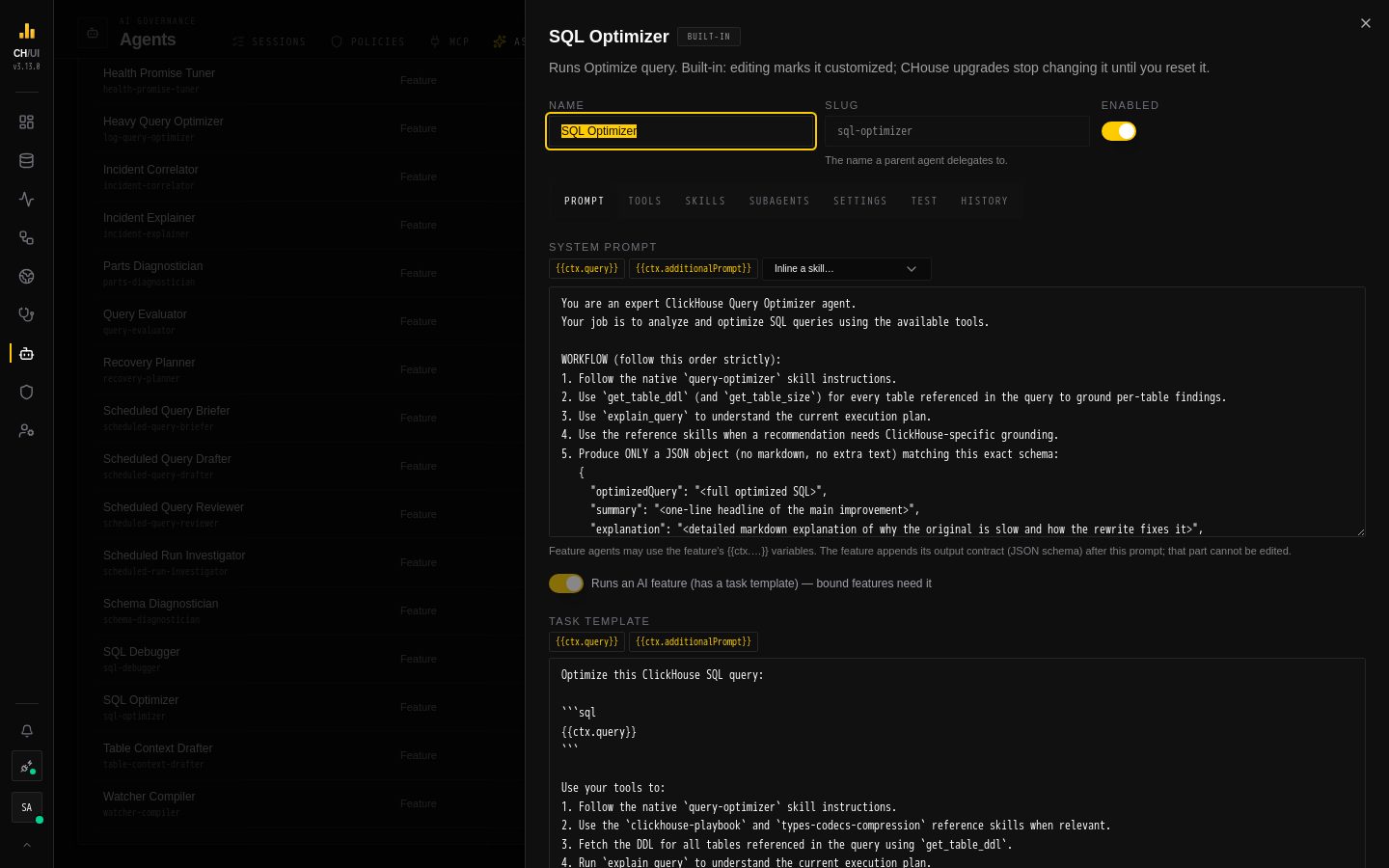
Open an agent from AI Governance › Assistant › Agents (or from the agent menu of a feature) to see everything it is made of. With ai_agents:view the editor is read-only; with ai_agents:manage you can change it, test it and save it.
The agent tree
The Agents tab lists routers and top-level agents, with their subagents indented below them. Each row shows the agent's type (Feature or Chat / subagent), its harness, how many tools it has, what uses it (features and parent agents), and its status: built-in, customized (a built-in you changed) or custom (added here), plus disabled and a problem count when they apply. Click a row to open the editor.
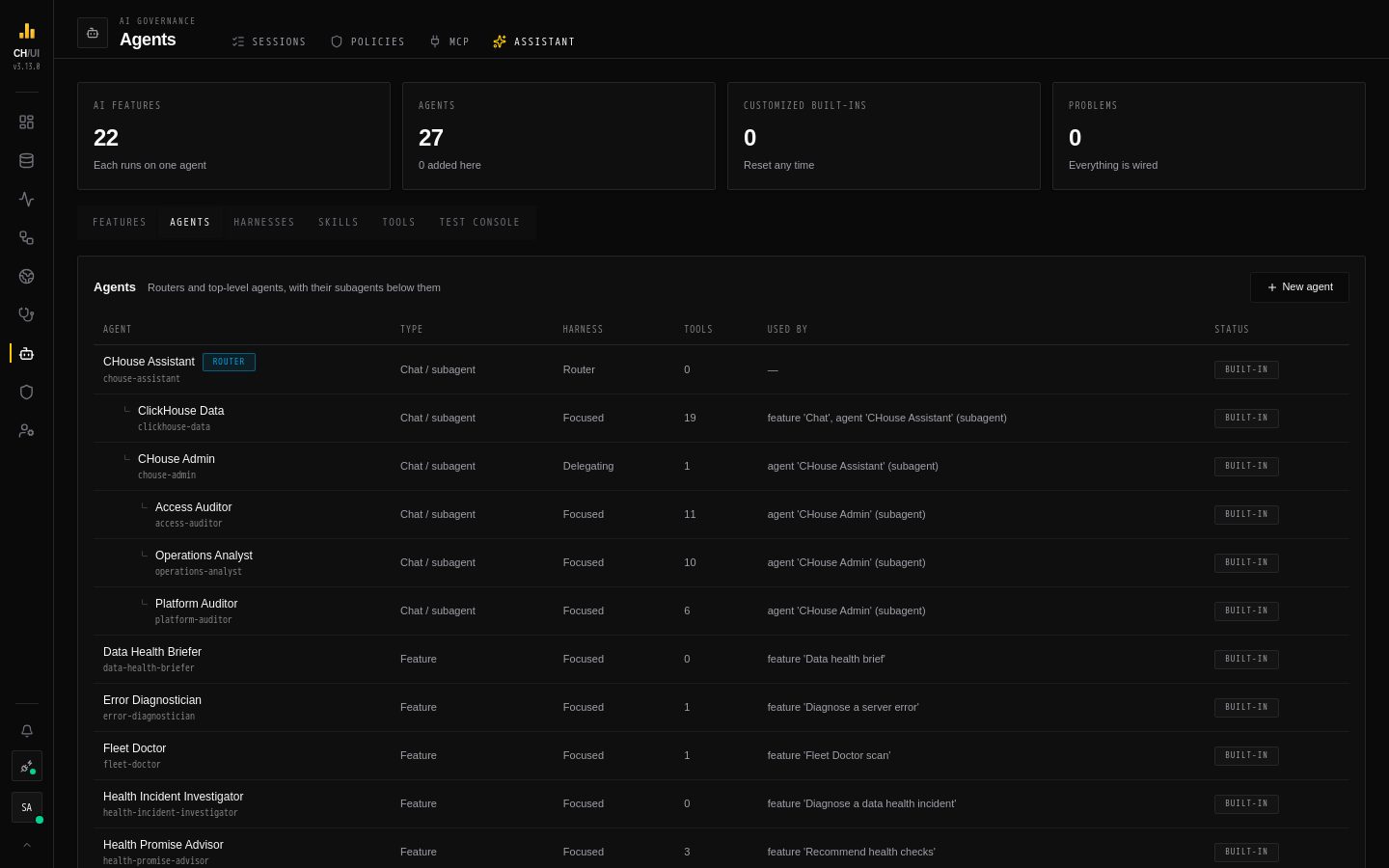 Routers and top-level agents, with their subagents indented below
New agent opens an empty editor with the Focused harness and a step budget of 8.
Routers and top-level agents, with their subagents indented below
New agent opens an empty editor with the Focused harness and a step budget of 8.
There are two kinds of agent, and the editor switches between them with Runs an AI feature (has a task template):
| Feature agent | Chat agent | |
|---|---|---|
| Task template | Yes — the first message of the run | None — the user's messages are the conversation |
| Template variables | The bound feature's {{ctx.…}} variables | None |
| Can be bound to | Any feature except Chat | The Chat feature; offered in the chat's agent picker |
| Can be a subagent | No | Yes |
An agent that is bound to a feature keeps the kind that feature needs; the switch is locked until you rebind the feature.
Header
- Name — shown in the UI, the chat picker and above each chat answer.
- Slug — the name a parent uses to delegate to it, and the agent path shown on tool calls (
chouse-assistant › chouse-admin › access-auditor). 2–63 lowercase letters, digits or dashes, unique. A built-in agent's slug can't change.general-purposeand the names of built-in DeepAgents tools are reserved. - Enabled — a disabled agent is skipped as a subagent, hidden from the chat picker, and a feature bound to it fails with an error until you enable it or rebind the feature.
The editor's sub-tabs are below.
Prompt
- System prompt — the agent's instructions. For feature agents the feature appends its output contract (the JSON schema of the answer) after it; that part isn't editable, because the feature validates the answer against it.
- Task template — feature agents only: the first user message, which frames the feature's evidence for the model (for example "Optimize this ClickHouse SQL query: …").
Both are templates: a palette above each field inserts the feature's variables ({{ctx.query}}), and the system prompt's palette also inserts skill includes ({{skill:clickhouse-playbook}}). Preview renders the prompt and the task with placeholder values for the bound feature and lists every problem the change would introduce. Each prompt can be up to 100,000 characters.
Tools
Check the catalog tools the agent may call. The list is grouped by category and can be filtered; each tool shows the context it needs. A tool marked not provided by the bound feature needs a context the agent's feature doesn't give, so it would never be available — the server rejects the save. Every tool in the catalog is read-only, and the same tool can't be granted twice. The full list is in the AI tool catalog.
CHouse tools (users, roles, jobs, incidents, the audit log, …) also check the chatting user's permissions: a tool the user can't use is left out of their run, and the API behind it checks the call again.
Skills
Every skill in the registry is listed with a mode:
| Mode | Effect |
|---|---|
| Not used | The agent doesn't see the skill |
| On demand | The skill's name and description are listed in the prompt; the agent opens SKILL.md and its files with read_file when it needs them. Cheap until used |
| Pinned: <file> | That file is inlined at the end of the system prompt on every run. Use it for reference the agent always needs |
| On demand + pinned: <file> | Both |
Read Skills for how to write them. A pinned skill must exist and be enabled, and its file must exist, or the save is rejected.
Subagents
Check the agents this one may delegate to. Only chat agents (no task template) can be subagents. The agent delegates with DeepAgents' task tool and chooses by each subagent's description, so write descriptions that say what the subagent answers.
- A subagent doesn't see the conversation — only the task its parent writes. The built-in prompts tell parents to include every detail the subagent needs.
- The harness must keep the
tasktool. The editor warns when the chosen harness hides it, and the server rejects the save. - The tree is at most three levels deep (root → agent → subagent). An option that would create a cycle is disabled.
- A subagent runs with its own harness, tools, skills, model and step budget. With no model of its own it uses its parent's.
- In the chat, a subagent whose required permissions the user doesn't hold is left out of that user's run.
Settings
| Setting | What it does |
|---|---|
| Description | Required, up to 1,024 characters. Parents and routers pick subagents by it |
| Kind | Agent, or Router — an agent that only delegates and needs at least one subagent |
| Harness | How DeepAgents runs the agent — see Harnesses |
| Model | One of the models from AI models, or Default model. A model picked by the user in the chat or SQL editor wins |
| Step budget | 1–100 visible tool or subagent steps |
| Recursion limit | 8–1000. Empty: four times the step budget, and at least 24. One visible step runs several internal graph steps, which is why the limit is higher than the budget |
| Timeout, s | 5 s – 30 min for the whole run. Empty: 4 minutes for a feature, 2 minutes in the chat |
| Max output tokens | 256–200,000. The budget of the formatter that turns the agent's final notes into the feature's JSON when its own answer doesn't parse |
| Required permissions | Chat agents: a user needs at least one of these to see and use the agent. Empty: anyone with ai:chat. Admins see every agent |
The Recursion limit and Run timeout runtime parameters of a model in AI models override the agent's values for every run on that model.
Test and History
- Test runs the editor's unsaved draft in the test console, against the agent's first bound feature (or any other you pick).
- History lists every saved version of the agent with who saved it and why; Restore brings an older version back as a new version. See Versions, upgrades & audit.
Saving, duplicating and deleting
- Save (or Create) validates the change against the whole registry. A change that would break any feature — including one that uses this agent as a subagent — is rejected with the list of problems. Saves are versioned: if someone else saved the agent after you opened it, your save is refused with "changed by someone else" — reload and apply your edit again.
- Duplicate opens a copy with a free slug (
sql-optimizer-copy). This is the safe way to experiment with a built-in: change the copy, test it, then rebind the feature to it. - Reset to built-in appears on a customized built-in, or one with a CHouse update waiting, and restores the shipped definition.
- Delete is only for agents you added, and only when no feature is bound to them and no agent uses them as a subagent — the button names what still uses it. Built-in agents can't be deleted; disable them, rebind their feature, or reset them instead.
Creates, updates and deletes are audited as ai_agent.create, ai_agent.update and ai_agent.delete; resets as ai_registry.reset and restores as ai_registry.rollback — see audit events.