
Datasets & promises
Observed tables with their baselines, drift and usage, and promises — explicit checks evaluated on a schedule with incidents.
- In the app
- Data › Datasets
/data/datasets - Needs any of
- observe:viewdata_health:view
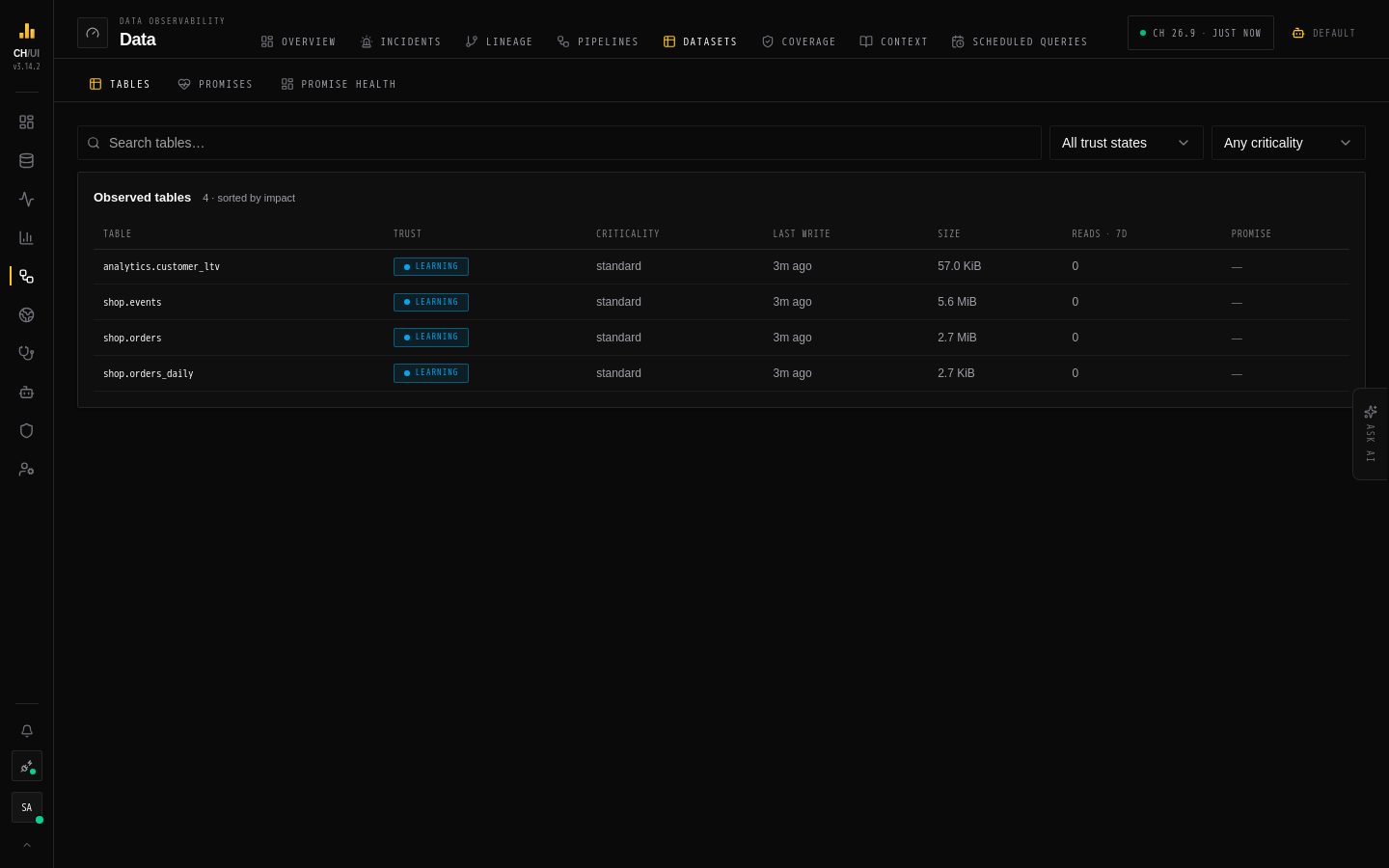
Data › Datasets has three views: Observed tables (every table CHouse UI watches, with its learned baseline), Promises (the checks you wrote) and Promise health (how those checks are doing). Every table is watched from day one; a promise is how you add an explicit expectation on top — "orders are loaded by 07:00", "no duplicate order ids".
Observed tables
The list shows each table's trust state, criticality, freshness, volume in the last hour against its baseline, its promises and any drift alerts. Filter by trust state and criticality, or search.
Open a table to see:
| Section | Shows |
|---|---|
| Header | Engine, size, ORDER BY, PARTITION BY, and buttons to Explorer, Lineage, Context and New promise |
| Rows per hour vs learned baseline · 48h | Writes against the learned band |
| Profile & distribution drift | Per-column statistics from a small sample, and which ones drifted |
| Schema history | Columns added, dropped or retyped |
| Usage · 7 days | Who reads it, and the most-filtered columns |
| Promises on this table | Or only the learned baseline protects this table |
Pin the table's criticality here if the learned one is wrong (needs observe:edit). Trust states and baselines are explained in How data is watched.
Promises
A promise names a dataset, the checks that must stay true, and when to evaluate them.
Checks
| Check | Passes when |
|---|---|
| Freshness | The newest event time is no older than a maximum age |
| Row count | Rows per window are between a minimum and/or maximum |
| Volume anomaly | Rows per window stay inside a band learned from recent windows (with optional hard limits) |
| Completeness | A column is non-null for at least a given share of rows |
| Uniqueness | A set of columns has at most a given share of duplicates |
| Validity | A SQL predicate holds for at least a given share of rows |
| Schema contract | Expected columns exist with the expected types (optionally no new columns) |
| Custom metric | A SQL expression compares to a threshold (>, >=, <, <=, =, between) |
| Distribution | A column's median, p95, null ratio, distinct ratio or top-value share stays within a tolerance of its own recent history |
Each check is a warning or critical. Windowed checks need an event-time column; integer or text timestamps need their stored format.
Create a promise
- New promise (from Promises, a table's page, or Accept on a suggestion). Needs
data_health:edit. - Dataset — a table or view, or a read-only dataset query when you need joins or casts. Set the event-time column and an optional row filter (e.g. one tenant).
- Evaluation cadence — Daily, Weekly, Monthly, Custom cron, Manual only, or After a scheduled query succeeds (evaluate right after a materialize job loads the data).
- Checks — add them by hand, or let the AI coverage advisor propose an editable draft from the schema and recent evidence (needs
ai:optimize). Set Alert after breaches, Recover after passes and a grace period to avoid flapping. - Notify on incident transitions — pick channels configured in Admin › Alerting. On a chat app channel the alert carries Acknowledge and Snooze 1h, and shows when the incident recovers.
- Validate before activation checks access, shows the generated SQL and the next evaluation slots. Then save.
Each promise runs as a scheduled query under the hood, with the same per-job leases, so it is evaluated once however many replicas you run.
Promise states
| State | Meaning |
|---|---|
| healthy | All enabled checks pass |
| degraded | A warning check is breaching |
| unhealthy | A critical check is breaching |
| unknown | Not evaluated yet, or still learning |
| paused | Evaluation is switched off |
A breach that lasts past the thresholds opens an incident, which appears in Data › Incidents next to pipeline and engine incidents. Acknowledge or snooze it there (needs data_health:edit). After fixing the cause, Run the promise to re-evaluate now (needs data_health:run) — or, when a job rewrites the window, its clear-and-rerun re-evaluates the affected windows.
Watches
A watch is a short-lived, personal promise — "keep an eye on shop.orders until tomorrow" — usually created by asking Chobi (the watch_table tool). It checks every 15 minutes that new rows keep arriving (a freshness check on the table's event-time column), opens an incident like any promise when they stop, and removes itself when it ends, with its checks and incidents.
| Rule | Value |
|---|---|
| Ends | 09:00 tomorrow by default, in your timezone; at most 7 days |
| How many | 5 active watches per person per connection |
| Owner | Always the person who asked; an administrator's edit can't move it |
| Undo | Creating one is undoable for 24 hours, like other undoable AI changes |
Your active watches are listed in Chobi's Now tab. To keep watching for longer, create a regular promise.
Permissions
| To | Needs |
|---|---|
| See promises and their incidents | data_health:view (your own); data_health:view_all for everyone's |
| Create and edit | data_health:edit |
| Run now | data_health:run |
| Delete | data_health:delete |
From the CLI: chouse health list|run|timeline|incidents|ack and chouse health dataset db.table for one table's trust state, baseline and incidents. See the CLI reference.
Tip: Start with one freshness check on each critical table. It catches the most common silent failure: the job succeeded but the upstream data never arrived.