
Single sign-on (SSO)
Delegate authentication to OIDC, OAuth2 or SAML identity providers with role mapping, JIT provisioning and config-file/env layering.
- In the app
- Admin › SSO
/admin/sso - Needs
- sso:view
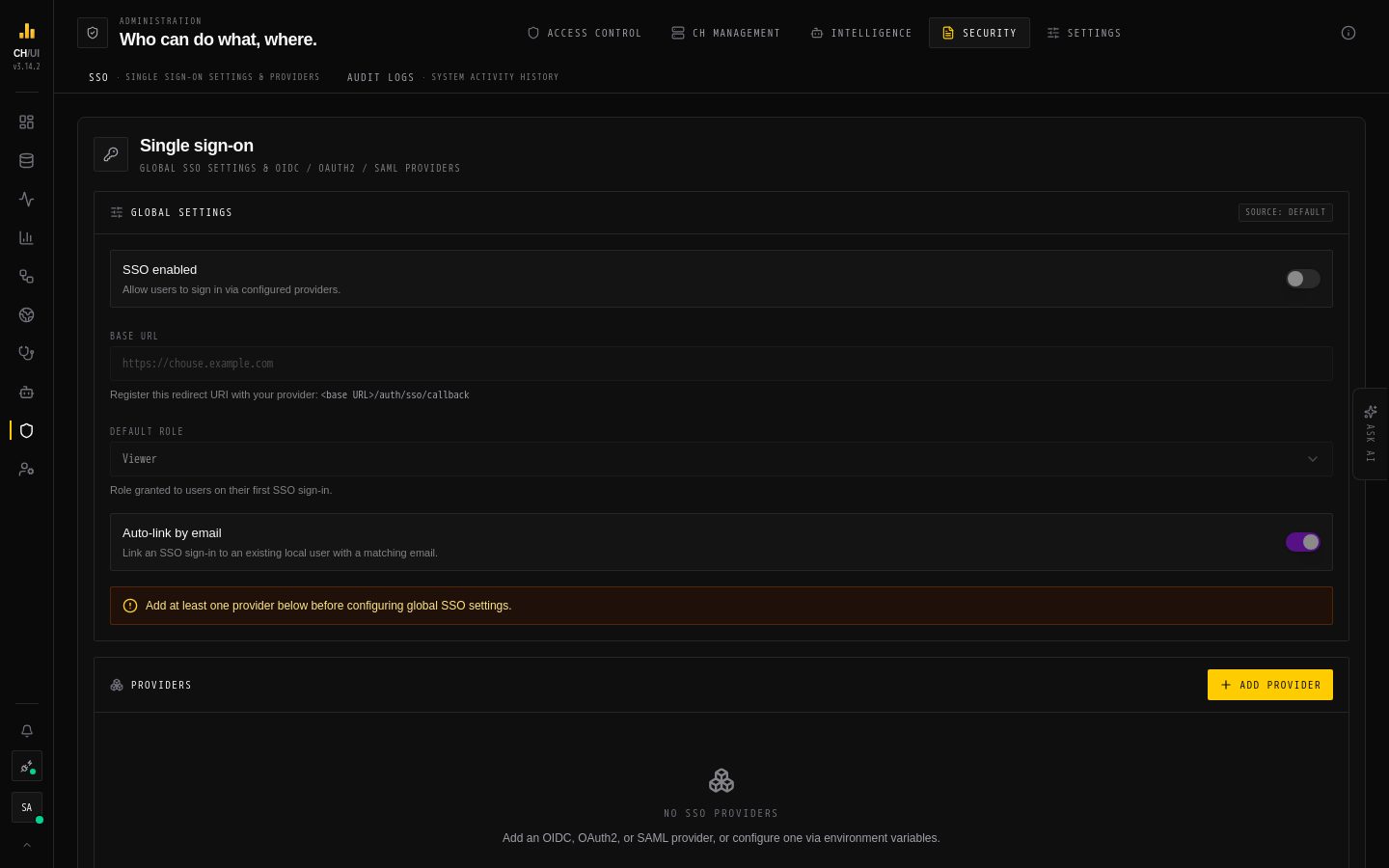
CHouse UI authenticates users against its own RBAC system. SSO lets that system delegate authentication to your identity provider (IdP) while still issuing the app's own session tokens and applying its own roles.
Three protocols are supported:
| Protocol | Use it for | Notes |
|---|---|---|
| OIDC | Okta, Auth0, Keycloak, Google, Microsoft Entra, any OpenID Connect IdP | Endpoints auto-discovered from the issuer. |
| OAuth2 | Plain OAuth2 providers (GitHub, custom) without OIDC discovery | You supply the endpoints and claim mapping. |
| SAML 2.0 | Enterprise SAML IdPs | SP- and IdP-initiated; assertion signature enforced. |
Providers can be defined in config (YAML/env, read-only) or managed live in the admin UI (stored in the database). Both can be active at once.
Providers created in the UI live under Admin › SSO (sso:view to see, sso:edit to change, sso:delete to remove).
Configuration sources & precedence
There are two layers:
- Config layer — environment variables, or a YAML file pointed at by
CHOUSE_CONFIG_PATH. YAML keys flatten 1:1 to env vars (e.g.auth.sso.base_url→AUTH_SSO_BASE_URL). This layer is read-only in the UI — providers defined here show up assource: configand cannot be edited or deleted from the admin screen. - Database layer — providers created/edited in the admin UI. These show up as
source: databaseand are fully editable.
Precedence: a provider id defined in config wins over a database provider with the same id (the database one is ignored). Global settings (enabled, base URL, default role, auto-link) come from the database layer when present, otherwise from config.
Each setting the UI displays carries a source:
config— set via env/YAML, read-only.database— set via the UI.default— neither was set; the built-in default applies.
Tip: pick one source of truth per provider. Use config for infrastructure-as-code / GitOps setups; use the UI for self-service.
Global settings
YAML (under auth.sso) / env:
| YAML | Env | Default | Description |
|---|---|---|---|
enabled | AUTH_SSO_ENABLED | false | Master switch. Must be true for any provider to work. |
base_url | AUTH_SSO_BASE_URL | — | Public URL of the app. Required when SSO is enabled; used to build redirect/ACS URLs. No trailing slash. |
default_role | AUTH_SSO_DEFAULT_ROLE | viewer | Role granted to newly provisioned users (unless role mapping overrides it). |
auto_link_by_email | AUTH_SSO_AUTO_LINK_BY_EMAIL | true | If a user with the asserted email already exists, link the SSO identity to it instead of creating a duplicate. See Security notes. |
auth:
  sso:
    enabled: true
    base_url: https://chouse.your-company.com
    default_role: viewer
    auto_link_by_email: true
    providers:
      # ... see below
The redirect URI you register at the IdP is always:
<base_url>/auth/sso/callback(OIDC/OAuth2). For SAML, the ACS URL is <base_url>/auth/sso/saml/acs — see the SAML section.
OIDC provider
The common case. Only the issuer, client credentials, and scopes are required; endpoints and standard claims come from OIDC discovery.
auth:
  sso:
    providers:
      okta:
        type: oidc
        display_name: "Okta"
        issuer: https://corp.okta.com
        client_id: "0oa..."
        client_secret: "..."
        scopes: "openid profile email"
        # Optional overrides (rarely needed):
        # authorization_endpoint: ...
        # token_endpoint: ...
        # userinfo_endpoint: ...
        # claim_mapping: "subject:sub,email:email,username:preferred_username"
Equivalent env (provider id okta):
AUTH_SSO_PROVIDERS_OKTA_TYPE=oidc
AUTH_SSO_PROVIDERS_OKTA_DISPLAY_NAME=Okta
AUTH_SSO_PROVIDERS_OKTA_ISSUER=https://corp.okta.com
AUTH_SSO_PROVIDERS_OKTA_CLIENT_ID=0oa...
AUTH_SSO_PROVIDERS_OKTA_CLIENT_SECRET=...
AUTH_SSO_PROVIDERS_OKTA_SCOPES=openid profile email
At the IdP, register <base_url>/auth/sso/callback as the redirect URI.
OAuth2 provider
For providers without OIDC discovery (e.g. GitHub). You provide the endpoints and a claim mapping that tells CHouse UI how to read the userinfo response.
auth:
  sso:
    providers:
      github:
        type: oauth2
        display_name: "GitHub"
        authorization_endpoint: https://github.com/login/oauth/authorize
        token_endpoint: https://github.com/login/oauth/access_token
        userinfo_endpoint: https://api.github.com/user
        client_id: "Iv1..."
        client_secret: "..."
        scopes: "read:user user:email"
        claim_mapping: "subject:id,email:email,username:login"
        # Optional: strict RFC 9207 `iss` validation. GitHub now sends
        # `iss=https://github.com/login/oauth` in the authorization response.
        # Without `issuer`, CHouse UI accepts the response anyway (the plain-
        # OAuth2 issuer is synthetic, so `iss` cannot match and is ignored).
        # Set it to validate `iss` strictly instead.
        issuer: "https://github.com/login/oauth"
GitHub private emails: if a user's primary email is private, the /user response returns email: null. CHouse UI automatically falls back to the /user/emails endpoint to find a verified primary — make sure the user:email scope is granted.
claim_mapping maps CHouse identity fields (subject, email, username, optionally displayName) to the keys in the provider's userinfo JSON. Pairs are field:claim, comma-separated; = also works as the separator.
SAML provider
auth:
  sso:
    providers:
      onelogin:
        type: saml
        display_name: "OneLogin"
        saml_idp_entity_id: https://app.onelogin.com/saml/metadata/123
        saml_idp_sso_url: https://corp.onelogin.com/trust/saml2/http-post/sso/123
        saml_idp_certificate: |
          -----BEGIN CERTIFICATE-----
          MIID...
          -----END CERTIFICATE-----
        saml_sp_entity_id: https://chouse.your-company.com
        # Optional:
        # saml_nameid_format: urn:oasis:names:tc:SAML:1.1:nameid-format:emailAddress
        # saml_allow_idp_initiated: false        # default: false
        # saml_trust_email_verified: false       # default: false — see Security notes
        # claim_mapping: "email:...,username:..."
        # role_mapping_claim: "memberOf"
        # role_mapping: "Admins:admin,Everyone:viewer"
Register these at the IdP:
| Field | Value |
|---|---|
| ACS URL (Assertion Consumer Service) | <base_url>/auth/sso/saml/acs |
| SP Entity ID / Audience | the value of saml_sp_entity_id (commonly your base_url) |
| NameID format | email address recommended |
In a YAML multi-line cert use a block scalar (|) as shown. In a single env var, escape newlines as \n — they are unescaped on load.
SP-initiated vs IdP-initiated
- SP-initiated (default, recommended): the user starts at the CHouse login page and is redirected to the IdP. The response is bound to the originating browser (relay cookie) and validated against the request id (
InResponseTo). - IdP-initiated: the user starts from the IdP's app dashboard. This is off by default (
saml_allow_idp_initiated: false) because it has no request to correlate against. Enable it only if you need it and understand the trade-off.
Assertion signatures are always validated against the configured certificate; the issuer is used only to route to the right provider, never to trust content.
Role mapping & provisioning
When a user signs in for the first time, CHouse UI provisions an account (JIT). The role assigned is:
- A role from
role_mappingif the asserted role claim matches, else - the global
default_role(viewerunless changed).
role_mapping_claim: "groups"            # the IdP claim holding the user's groups/roles
role_mapping: "ch-admins:admin,ch-readers:viewer"role_mapping_claimnames the claim (OIDC/OAuth2) or assertion attribute (SAML) that carries the user's groups/roles.role_mappingmaps each IdP value to a CHouse role. Unmapped values fall through todefault_role.
Auto-link by email: with auto_link_by_email: true, an SSO identity whose asserted email matches an existing user is linked to that user rather than creating a duplicate account. See the caveat in Security notes.
Linking additionally requires verification proof from the second provider:
- OIDC —
email_verified: truein the ID token. - GitHub (OAuth2) — the address comes from
/user/emailsasverified. A public/useremail alone is not proof and will not auto-link. - SAML —
saml_trust_email_verified: trueon that provider. - Generic OAuth2 / unverified OIDC email — never auto-links.
When the email is already taken but the second provider offers no proof (or auto_link_by_email is off, or two first-logins race), sign-in fails closed with 409 Conflict — “An account with this email already exists. Sign in with your original provider, then link the new provider from account settings.” No session is minted and no raw database error is exposed.
Once a user has any linked SSO identity, password login is rejected for that account (admins keep a break-glass exception) — they must sign in through the IdP.
Disabling password login
To make SSO the only way in, turn off username/password sign-in:
auth:
  password_login:
enabled: false # env: AUTH_PASSWORD_LOGIN_ENABLED=false- Default is enabled. Only the literal
falsedisables it. - Fail-safe: the toggle is ignored unless at least one usable SSO provider is configured. If you set
enabled: falsewith no valid provider, the server boots, logs a loud error, and keeps password login on so no one is locked out. "Usable" means a provider that passed validation — a typo'd provider that was dropped at load does not count. - When effective, the login page hides the password form and the
POST /api/rbac/auth/loginendpoint returns403. SSO buttons remain. - Changing your own password (for accounts that still have one) is unaffected.
Security notes
- Trust IdP-asserted email is OFF by default. Each SAML provider has a
saml_trust_email_verifiedflag (defaultfalse). When off, an asserted email is treated as unverified, which gates auto-linking to an existing account. This is deliberate: blindly trusting an IdP-asserted email enables account takeover — a malicious or misconfigured IdP could assert a victim's email and inherit their account. Only enable it for IdPs you fully control and trust to verify email ownership. auto_link_by_emailcarries the same risk surface: it links by email, so it relies on the IdP having verified that email. Keep email-trust conservative.- RBAC permissions gate the admin UI:
sso:view,sso:edit,sso:delete. Grant them only to administrators. - Config-sourced providers are read-only in the UI (
source: config) — they can't be edited or deleted from the screen, only from your config. - Secrets are encrypted at rest (AES-256-GCM) and are never returned by the API — the UI shows a masked placeholder and only writes a new secret when you supply one.
Multi-replica SAML
SAML is safe across replicas. The three short-lived stores the flow depends on — request ids (for InResponseTo validation), seen assertion ids (replay protection), and the one-time ACS→login handoff codes — live in the RBAC database, not in process memory (ADR 0010). No sticky sessions are required.
Before v3.12.0 these were per-process Maps. On a multi-replica deployment that broke SP-initiated login roughly (N-1)/N of the time, and — more seriously — made replay protection ineffective, since the same assertion could be replayed against a replica that had not seen it. If you ran multi-replica SAML on an older version, upgrading closes that gap.
OIDC/OAuth2 flows never had this constraint (state travels in a signed cookie).
Troubleshooting
- No SSO buttons on the login page.
auth.sso.enabledmust betrueand at least one provider must pass validation. Check server logs at boot — invalid providers are logged and skipped. redirect_urimismatch (OIDC/OAuth2). The URI registered at the IdP must be exactly<base_url>/auth/sso/callback, andbase_urlmust match the public URL the browser uses.- GitHub login fails with
unexpected "iss" (issuer) response parameter value. GitHub now sends an RFC 9207issparameter (https://github.com/login/oauth) that cannot match the synthetic plain-OAuth2 issuer. Upgrade to a version with the fix (OAuth2 callbacks ignoreissunlessissueris set); optionally setissuer: "https://github.com/login/oauth"for strict validation. - SAML "Destination/Audience" errors. The ACS URL at the IdP must be
<base_url>/auth/sso/saml/acs; the SP entity id / audience must equalsaml_sp_entity_id. - SAML works for one user but fails intermittently. On v3.12.0+ this is no longer a replica-count problem — see Multi-replica SAML. Check clock skew between the IdP and the server first.
- Set
LOG_LEVEL=debugto log the non-sensitive SAML envelope fields (audience, destination,InResponseTo, clock) that cause most failures.