
AI activity
What CHouse's own AI costs and sends out: tokens, estimated cost, ClickHouse queries and the data sent to LLM providers, per request.
- In the app
- AI Governance › AI activity
/ai/usage - Needs any of
- ai_usage:viewai:chatai:optimize
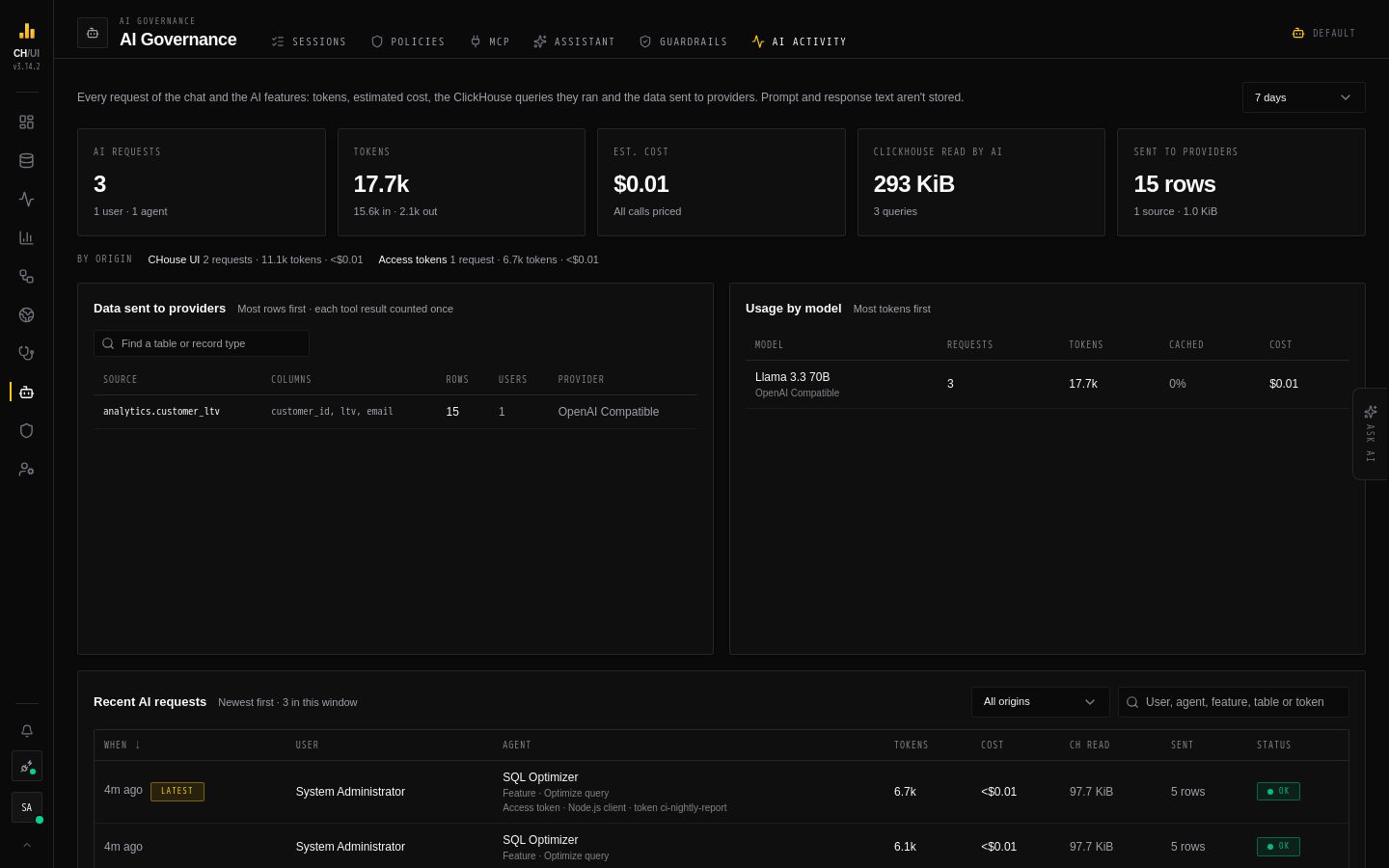
AI Governance › AI activity (/ai/usage) shows what CHouse's own AI costs and what data it sends out: every request of the chat and of the AI features, with its tokens, estimated cost, the ClickHouse queries it ran and the data that went to the LLM provider. That includes AI features an MCP agent or the chouse CLI starts with a token (ai_optimize, doctor_scan, chouse ai optimize): each request says where it came from. What those agents do outside CHouse's AI is under Sessions.
Prompt and response text are not stored. The chat keeps the question and the final answer in its thread, as before.
Who sees what
| Permission | Sees |
|---|---|
ai_usage:view | Everyone's AI requests. Admin and Super Admin have it |
ai:chat or ai:optimize | Their own requests only; the tab says Your AI requests |
What the tab shows
| Section | What it shows |
|---|---|
| Tiles | Requests, tokens (in and out), estimated cost, bytes ClickHouse read for the AI, and rows sent to providers |
| By origin | Requests, tokens and cost split by where they came from (see below) |
| Data sent to providers | Each ClickHouse table, or CHouse record type (users, audit log, tokens…), that reached a model: columns, rows, users and providers. Most rows first; the top 100 are listed, with Top 100 of N when there are more, and the search finds any of them |
| Usage by model | Requests, tokens, the share of input served from the provider's cache, and cost per model |
| Recent AI requests | Newest first, 25, 50 or 100 per page. Each request with its user, agent, tokens, cost, ClickHouse read, rows sent and status; an MCP or token request also names its client and token. Filter by origin, and search by user, agent, feature, table, client or token name |
Pick Today, 7 days or 30 days at the top. The two top panels keep the same size and scroll inside; so does a long page of requests.
Where a request came from
| Origin | Started by |
|---|---|
| CHouse UI | Someone signed in to the UI: the chat, or an AI button such as Optimize |
| MCP agents | An agent over MCP, with a personal access token. The request names the agent (Claude Code, Cursor, …) and the token |
| Access tokens | A direct token caller such as the chouse CLI or a script, named by its client and token |
| Background | CHouse itself: scheduled Doctor scans and automatic diagnoses |
| Not recorded | Requests recorded before origins were tracked |
A token that was deleted afterwards shows as a deleted token; its requests keep their origin.
Reading a request
Click a request to open it. Its steps read from Start at the top to Finished (or Timed out, Failed) at the bottom, in the order they began:
| Part | Meaning |
|---|---|
#3 · +1.1s | The step's place in the order, and how long after the start it began |
| Indentation | Who works for whom: a subagent's steps sit one level in from the agent that handed it the work, and a tool one level in from the agent that called it |
| ✨ LLM call | One call to the model, by the agent named on it, with its tokens and cost |
| 🔧 Tool | One tool call, with the data it returned to the model (Sent …) and the ClickHouse queries it ran |
| Hands to … | The agent passed the work to a subagent |
| Calls … | The agent asked for a tool |
| Answers … | A subagent finished and passed its answer back up |
| Final answer | The step that produced the reply |
Query logs on a query opens it in Query logs; a query on another connection names that connection instead, because Query logs reads the active one. For your own chat requests, Open in chat opens the conversation it came from.
How it is measured
- Tokens are what the provider reports for each call. A call that times out, is stopped, or gets no usage from the provider counts no tokens; the request then shows
≥and a note says the totals are a lower bound. - ClickHouse cost comes from each query's own statistics as it finishes, so it needs no access to
system.query_log. Every query the AI runs gets aquery_idstartingchouse-ai-and anai_request_idin itslog_comment, sosystem.query_logties it to the request too. - Data sent is everything a tool returned to the model, counted once per tool call. Sending the growing conversation back on later turns is already in the input tokens.
From agents, the CLI and the chat
The same data is available outside the tab, with the same permissions:
- MCP:
get_ai_usage,get_ai_data_egress,list_ai_requestsandget_ai_request(see MCP tools). - CLI:
chouse ai usage [--by origin|model],chouse ai egress,chouse ai requests [--origin …]andchouse ai request <id>(see CLI reference). - Chat: ask CHouse Admin, for example "what did MCP agents spend on AI this week?".
Prices
Cost is estimated from the price you give each model in Admin › AI Models › Provider models (USD per 1M tokens: input, output, and optionally cached input and cache write). See AI models.
- A model without a price shows tokens but no cost (
–, never$0), and a banner names it with a link to set one. - The Est. cost tile then sums the priced models only.
- A price applies to requests from then on; past costs don't change.
Keeping data
Requests are kept for 30 days and then deleted, hourly, by every server. Change it with AI_USAGE_RETENTION_DAYS (1–365; see environment variables).