
MCP server
Operate CHouse UI from AI agents over Model Context Protocol at /mcp — turned on and tool-by-tool in AI Governance › MCP, read-only by default.
- In the app
- AI Governance › MCP
/ai/mcp - Needs
- agents:view
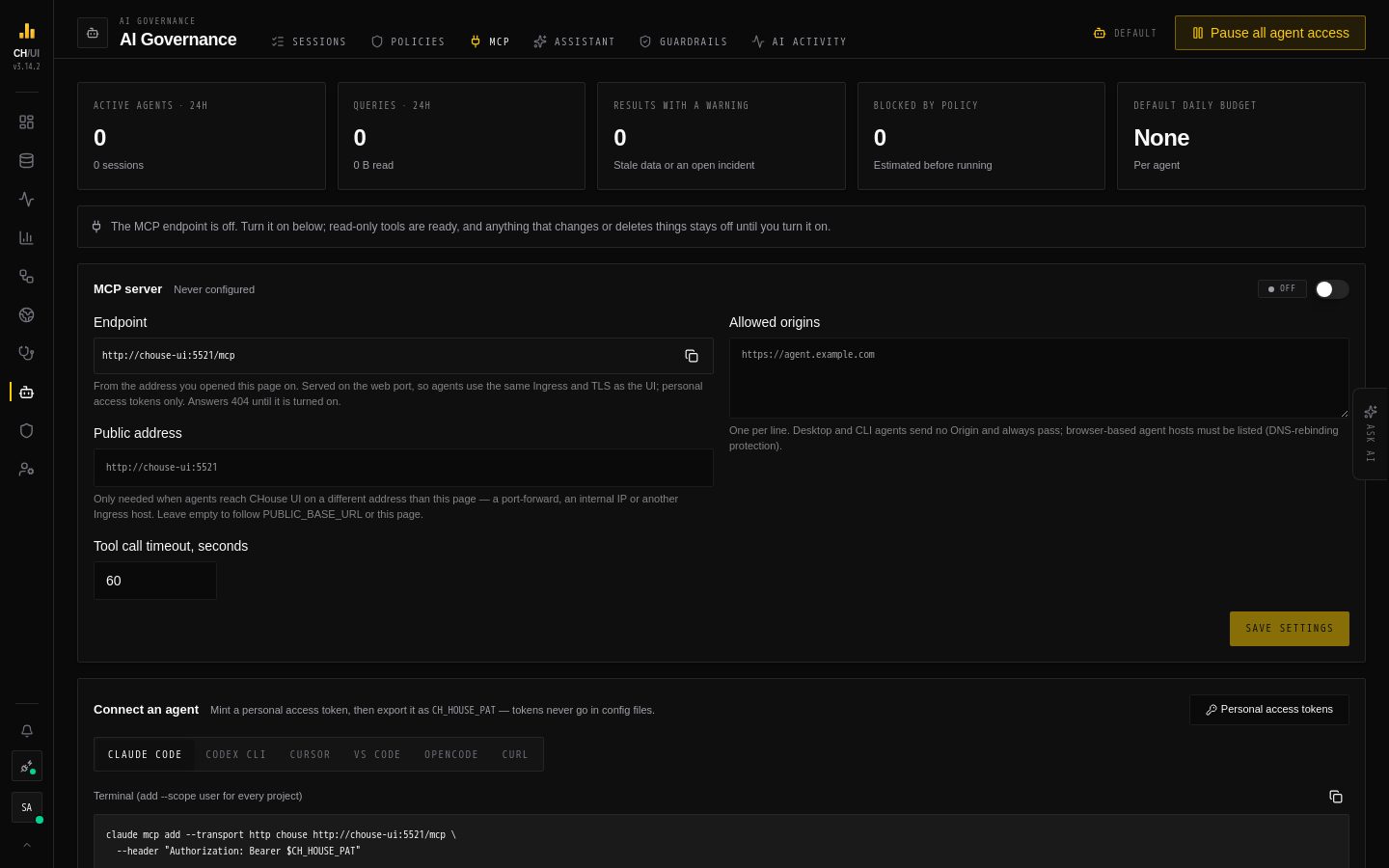
AI agents — Claude Code, Codex, Cursor, VS Code Copilot, OpenCode, CI pipelines — can operate CHouse UI over the Model Context Protocol at /mcp on the same address as the UI, so there is no extra port, Service or Ingress. The transport is Streamable HTTP; authentication is a personal access token (Authorization: Bearer ch_pat_…), checked live on every call.
Safe by default: the endpoint is off until an administrator turns it on, only read tools are on until an administrator turns on more, and destructive tools are approved by a person in the agent's own client before they run.
Turn it on
There is nothing to set in the environment, Compose or Helm. Until it is turned on, the endpoint answers 404 MCP_DISABLED.
-
Sign in with
agents:manage(Admin and Super Admin by default) and open AI Governance › MCP. -
Switch MCP server on. The page shows the endpoint agents use, taken from (in order):
- the Public address you set on the page — when agents reach CHouse UI on another address than you do (a port-forward, an internal IP, another Ingress host);
- the server's
PUBLIC_BASE_URL; - the address you opened the UI on — right when people and agents use the same host.
It warns when the result is
localhost, which agents on other machines can't reach. -
Optionally list allowed origins (only browser-based agent hosts send an
Origin) and change the tool call timeout (1–600 s, default 60). -
Review the tools (below) and turn on what your agents need.
Changes reach every replica within a few seconds, without a restart, and are audited as agent.mcp_update. Anyone with agents:view can see the settings; chouse mcp settings shows them from the CLI.
Behind a reverse proxy: MCP streams responses over server-sent events, like AI chat. Turn off response buffering and raise the read timeout for the UI host (nginx: proxy-buffering: "off", proxy-read-timeout: "300").
Upgrading from 3.13: port 8752, the MCP_* variables, the mcp.* YAML keys and the chart's mcp.* values are gone; the server logs a warning while an old key is still set. Point agents at https://<host>/mcp and turn MCP on — it starts off after the upgrade, whatever MCP_ENABLED was.
Mint a token
Preferences › Personal access tokens → create one token per agent and export it as CH_HOUSE_PAT. A token can be scoped: one with only table:select, metrics:view caps the agent whichever tools are on, and tools/list only shows the tools the token's permissions allow. Every call re-checks your live roles against the token's scopes, so revoking the token, removing a role or deactivating the user takes effect on the next call.
Connect a client
AI Governance › MCP has copy-ready setup for each client with your endpoint filled in, and chouse mcp config <claude-code|codex|cursor|vscode|opencode> prints the same for your CLI profile. The token always comes from CH_HOUSE_PAT or a secret prompt — never paste it into a config file. With the endpoint at https://chouse.corp/mcp:
Terminal (add --scope user for every project):
claude mcp add --transport http chouse https://chouse.corp/mcp \
--header "Authorization: Bearer $CH_HOUSE_PAT"codex mcp add chouse --url https://chouse.corp/mcp --bearer-token-env-var CH_HOUSE_PAT.cursor/mcp.json:
{
  "mcpServers": {
    "chouse": {
      "url": "https://chouse.corp/mcp",
      "headers": {
        "Authorization": "Bearer ${env:CH_HOUSE_PAT}"
      }
    }
  }
}
.vscode/mcp.json — VS Code prompts for the token and stores it as a secret:
{
  "servers": {
    "chouse": {
      "type": "http",
      "url": "https://chouse.corp/mcp",
      "headers": {
        "Authorization": "Bearer ${input:chouse_pat}"
      }
    }
  },
  "inputs": [
    {
      "id": "chouse_pat",
      "type": "promptString",
      "description": "CHouse UI personal access token",
      "password": true
    }
  ]
}opencode.json:
{
  "$schema": "https://opencode.ai/config.json",
  "mcp": {
    "chouse": {
      "type": "remote",
      "url": "https://chouse.corp/mcp",
      "enabled": true,
      "oauth": false,
      "headers": {
        "Authorization": "Bearer {env:CH_HOUSE_PAT}"
      },
      "timeout": 60000
    }
  }
}
Smoke test — lists the tools your token gets:
curl -s https://chouse.corp/mcp \
  -H "Authorization: Bearer $CH_HOUSE_PAT" \
  -H "Content-Type: application/json" \
  -H "Accept: application/json, text/event-stream" \
  -d '{"jsonrpc":"2.0","id":1,"method":"tools/list","params":{}}'
Requests without an Origin header (curl, the CLI, desktop agents) always pass the origin check; requests that carry one must match an allowed origin (DNS-rebinding protection).
Try the hosted lab
https://lab.chouse-ui.com/mcp is a hosted instance you can point any client at without deploying anything. Create a token in the lab's UI (same Preferences flow) and use it as above. The lab keeps the default-safe policy — read tools only — so it is safe to experiment with.
Tools
Every tool's description, access level, required permissions and parameters are on the MCP tool catalog, generated from the server, and in AI Governance › MCP. There you switch each tool, or a whole category, on or off:
- Read tools are on by default.
- Write and destructive tools, and tools that spend LLM budget, stay off until an administrator turns them on; turning on one that changes or deletes things asks for confirmation.
- A tool added in a later release arrives in its default state. Reset to defaults puts every tool back.
tools/list only shows a token the tools that are on and that its permissions allow. The API behind each tool still checks permissions and data access on every call, and each tool's MCP annotations (readOnlyHint, destructiveHint) follow its access level so clients prompt for the right calls.
The server also offers resources — chouse://connection/{id}, chouse://database/{name}, chouse://table/{db}/{table}, chouse://saved-query/{id}, chouse://scheduled-job/{id}, chouse://health-check/{id}, chouse://doctor-report/{id} — and prompts: investigate-slow-query, diagnose-incident, review-schema, plan-schema-migration.
Which connection: pass X-Connection-Id as a request header or a connection_id argument on each tool call (use_connection only checks an id); otherwise the token owner's default connection is used. Nothing is pinned on the server, so any replica can serve any call.
Write tools
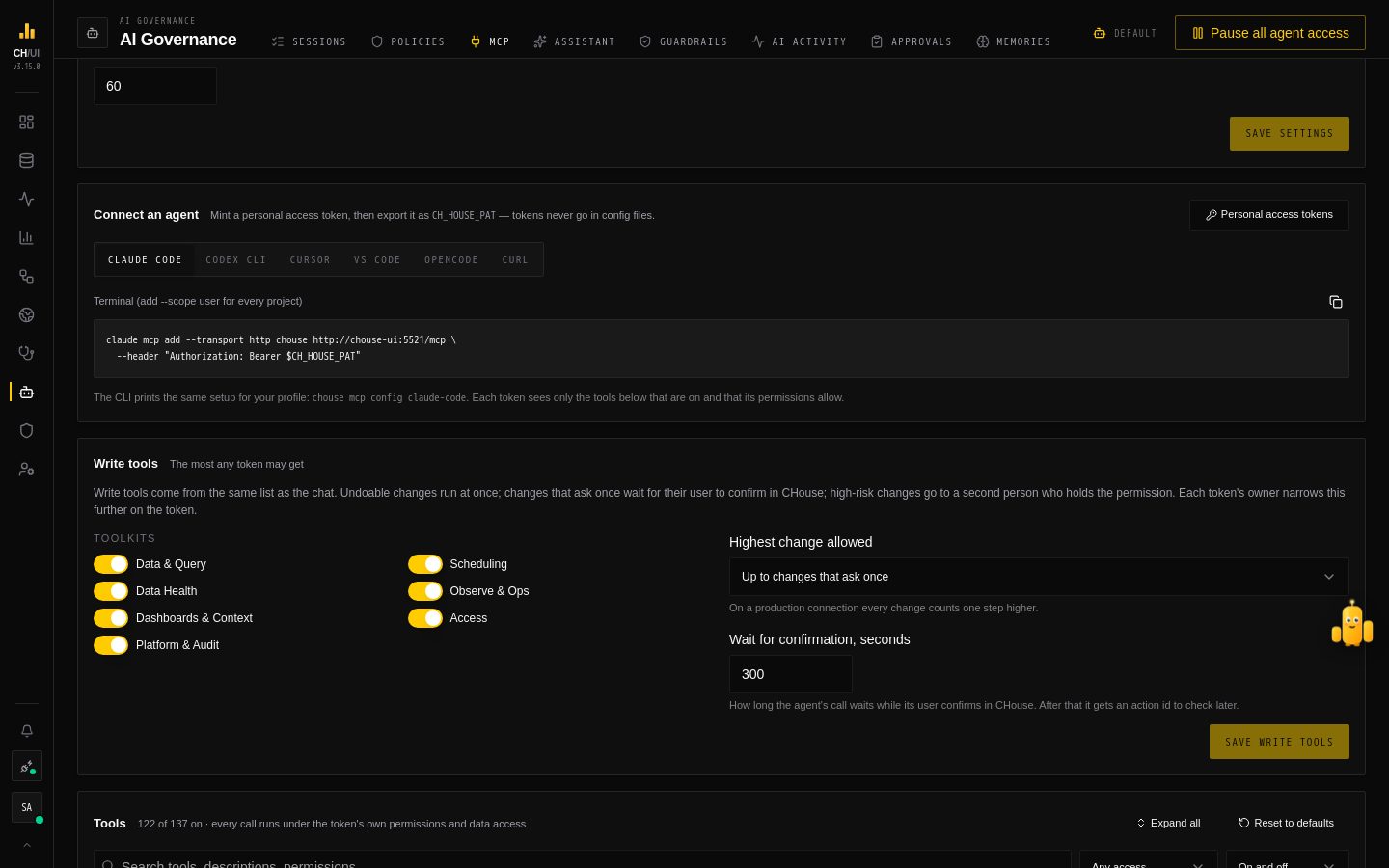 AI Governance › MCP › Write tools: the most any token may get
Besides its hand-written tools, MCP offers CHouse's write tools — the same 74 the chat uses, checked the same way by tier. Only a token whose user has ai:act (or is an administrator) gets any. Which ones it gets is decided twice:
- The ceiling — AI Governance › MCP › Write tools, for every token: which toolkits MCP may expose, the highest change allowed (only undoable changes, up to changes that ask once — the default — or also high-risk changes), and how long a held call waits for confirmation (300 seconds by default, up to 900).
- The token's policy — the wrench next to a token in Preferences › Access tokens, set by its owner from a browser session: its toolkits (default: Data & Query), and for each tier what happens — Run, Ask me in CHouse or Off for undoable and ask-once changes; Send to a second approver or Off for high-risk ones. Rotating a token keeps its policy.
A call that should ask is held: the client's call stays open (with progress notifications) while you confirm or decline it in Chobi or Approvals. Confirmed in time, it runs and the call returns its result; otherwise the call returns a pending action_id, and get_action_status runs it once you confirm. Undoable changes return an undo id for undo_action. A token that cannot read its policy gets no write tools at all.
The endpoint is stateless, so a policy change applies on the client's next tools/list, and CHouse never asks the client back: confirmations happen in CHouse, where they are audited.
Human approval per client
Once an administrator turns a destructive tool on, a person approves each call in the client, through the host's own permission prompt. The tool switches are the hard ceiling — an agent can never turn a tool on. Tool names below assume you registered the server as chouse.
| Client | Default | Make destructive tools ask |
|---|---|---|
| Claude Code | Prompts on first use (manual mode) | permissions.ask: ["mcp__chouse__*"] |
| Codex CLI | Per approval policy | default_tools_approval_mode = "prompt" (or "writes") |
| Cursor | Asks per call | Leave "Always allow" off for these tools |
| VS Code Copilot | Confirms each call | Keep per-tool auto-approve off |
| OpenCode | Allowed | permission ask rules |
| Claude Desktop | Asks per call | Don't choose "Always allow" |
| CI / headless | No person present | None — tool switches and a narrowly scoped token are the only guardrails |
{
  "permissions": {
    "ask": ["mcp__chouse__*"]
  }
}[mcp_servers.chouse]
default_tools_approval_mode = "prompt" # or "writes"
[mcp_servers.chouse.tools.kill_query]
approval_mode = "prompt"{
"permission": {
"chouse_kill_query": "ask",
"chouse_query_raw": "ask",
"chouse_delete_saved_query": "ask",
"chouse_delete_scheduled_job": "ask"
}
}Warning: Unattended agents (claude -p, codex exec, OpenCode --auto, CI) have no one to ask. Don't give them a token that can use destructive tools unless you accept that trade-off.
Safety model
| Layer | Guarantee |
|---|---|
| Off by default | The endpoint, and every write, destructive and LLM-spending tool, stay off until an administrator turns them on; an agent can't opt in |
| Live authorization | Every call checks the token against the user's current roles and the token's scopes; data access policies and rate limits apply as in the UI |
| SQL classification | query accepts one SELECT/WITH/SHOW/DESCRIBE/EXPLAIN statement, checked with the same parser that guards the API; anything else fails closed |
| Human approval | Write tools ask in CHouse by their tier (above); hand-written destructive tools are approved in the client |
| Result limits | 100 rows, 200 KB and 2 KB per cell, with tokens and password-like fields redacted before anything reaches the model |
| Privilege fence | Tokens, passwords, sign-in, SSO, AI provider secrets, ClickHouse users, creating or deleting connections, audit pruning and export, uploads, and approving actions or fixes are never tools. Users, roles and policies are second-approver write tools, off over MCP until an administrator allows high-risk changes |
| Governance | Every call lands on an agent session; queries pass budget checks, results carry health notices, and an administrator can pause all agent access (AGENT_ACCESS_PAUSED / AGENT_POLICY_BLOCKED) |
| Audit | Every tool call is in the audit log as mcp.tool_call, attributed to the token's user |