
Query logs
Five sub-views over system.query_log — Queries, Patterns, By table, By Redash and the duration/memory histogram.
- In the app
- Monitoring › Query logs
/monitoring/logs - Needs
- logs:view
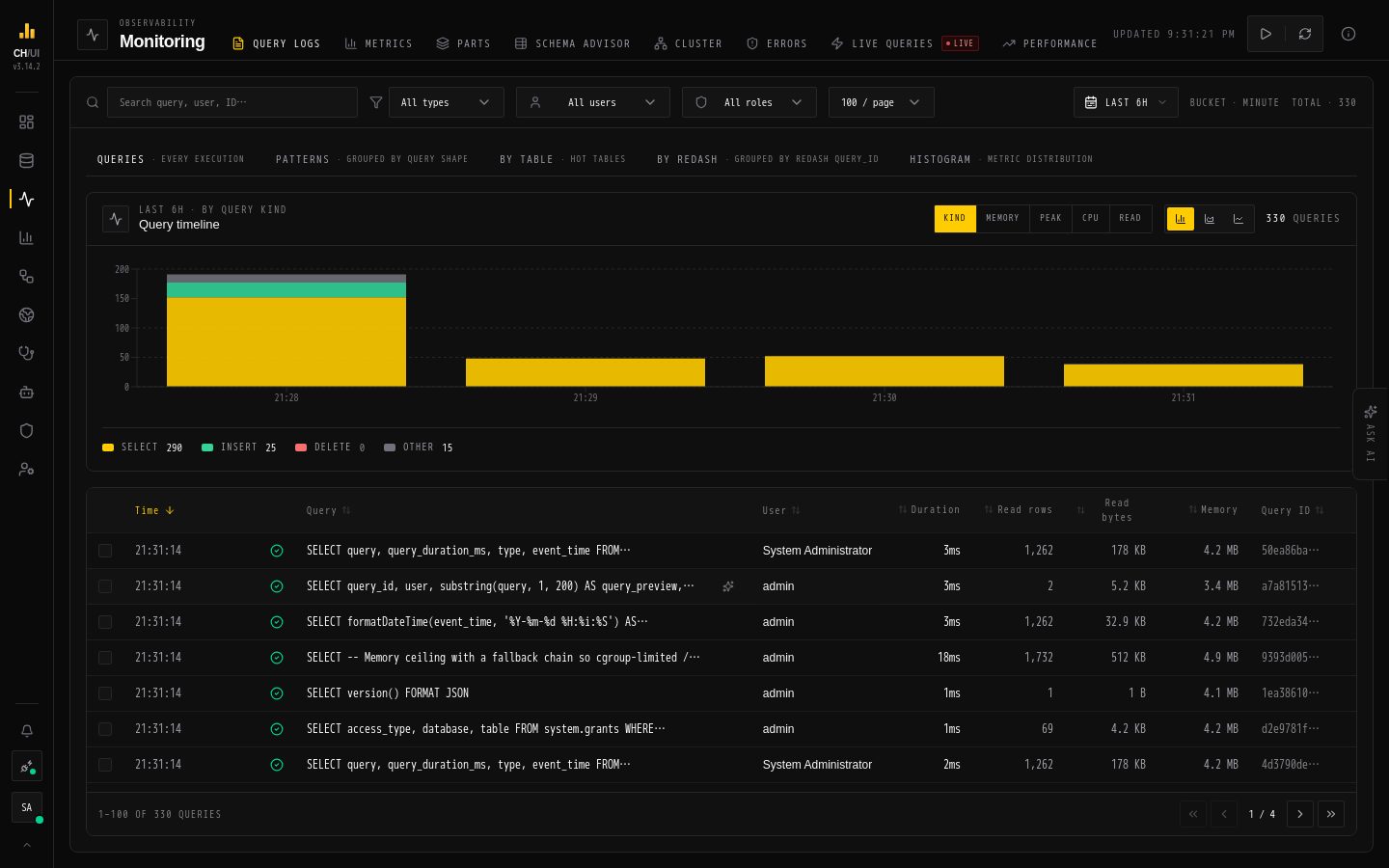
Query logs is the deep-dive surface over system.query_log — every execution the cluster recorded, rolled up and charted five different ways. It lives at /monitoring/logs and requires the logs:view permission.
Five sub-views
The tab strip switches between five sub-views. All of them honor the shared time-range picker (15 m / 1 h / 6 h / 24 h presets plus a Grafana-style drill-down calendar from day → month → year in one popover).
Queries
Every execution as a dense, sortable table:
- SQL-keyword tooltip preview on hover — see the statement without opening the row
- Memory-pressure flags: a flame icon at ≥ 25 % cluster RAM, a triangle at ≥ 10 %
- Row checkboxes for side-by-side Compare
- Expanded-row drill-downs for Profile events and Views triggered (
system.query_views_log)
Patterns
normalizeQuery() rollup with cumulative cost — Runs, Avg duration, Total duration, Max memory, Read rows, Read bytes. Default sort is Total duration DESC, which surfaces the patterns hogging the most wall-clock time across all repetitions, not just single slow queries.
By table
arrayJoin(tables) per-table rollup with arrayFilter push-down, so busy clusters return in roughly one second. Use it to answer "which table drives the load?".
By Redash
Groups every Redash-originated query by the query_id embedded in its leading SQL comment (/* … query_id: NNNN … */), mapping cluster load back to saved dashboard queries. Shows Runs, Min/Avg/Max/Total duration, Min/Max memory, read rows and read bytes — all sortable.
Histogram
Distribution of duration, memory, read rows and read bytes across the active window, with p50 / p95 / p99 chips. p99 is amber-tinted to flag the tail.
Timeline chart
Alongside the sub-views, the query timeline chart renders stacked bar, stacked area and line variants grouped per query_kind. It is the fastest way to spot a load spike before drilling into the tables.
Chouse AI integration
With the ai:optimize permission, a query-log row exposes Optimize with Chouse AI:
- An optimized rewrite that produces the same result
- A before → after
EXPLAINestimate as proof - One click to Open in Explorer to run the rewritten query
The AI is read-only and advisory — review the rewrite before running it. See Chouse AI in-tab.
Underlying data
| Source | Used for |
|---|---|
system.query_log | All sub-views, timeline chart |
system.query_views_log | Views-triggered drill-down |
system.query_thread_log / profile events | Expanded-row detail |