
Draft with AI
Describe an agent, harness or skill and get a complete, validated draft in the editor — every section filled or explained, redraft a section, refine with an instruction.
- In the app
- AI Governance › Assistant › Draft with AI
/ai/assistant - Needs any of
- ai_agents:manageai:optimize
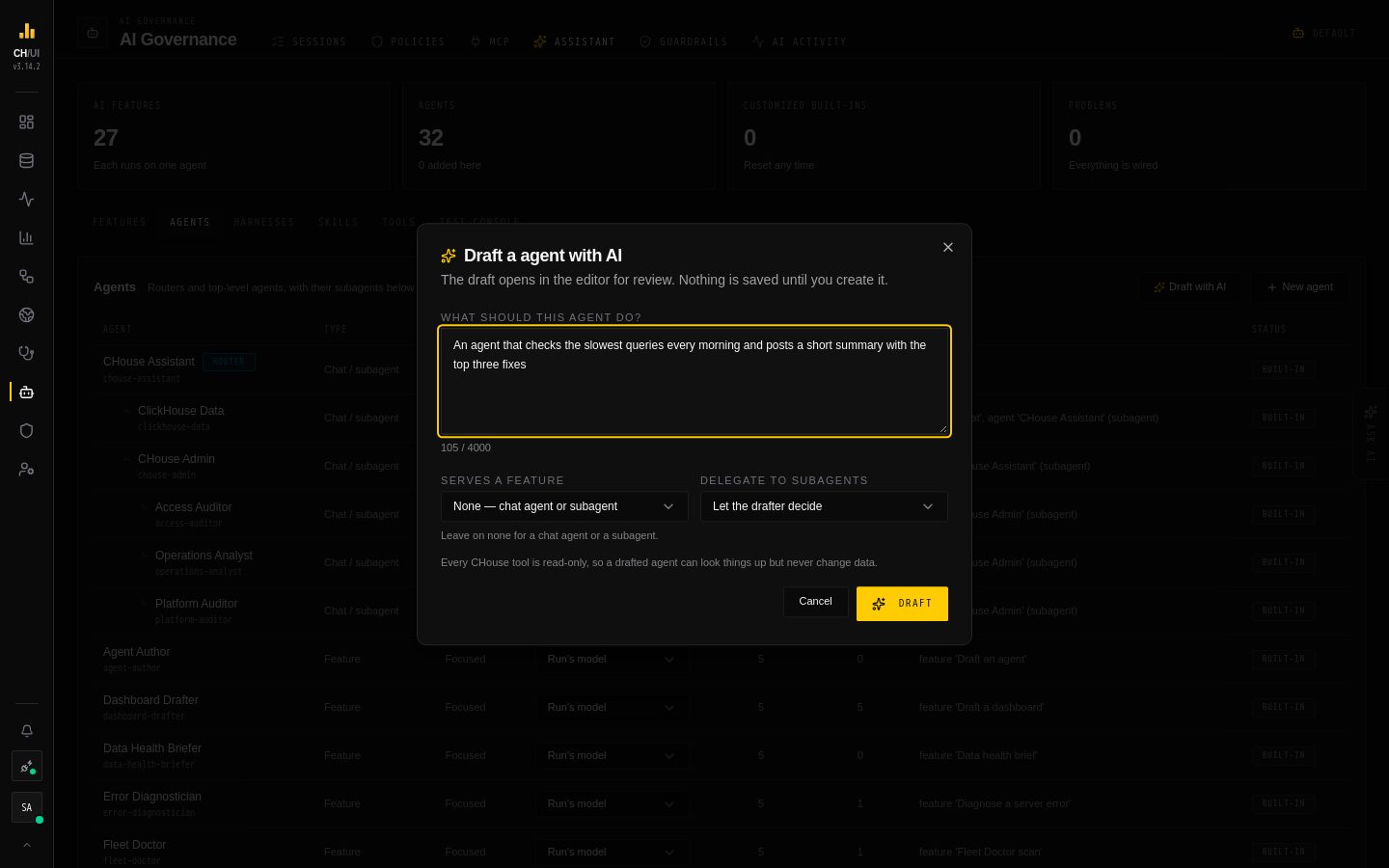
Writing a good agent, harness or skill by hand means knowing DeepAgents and the registry rules. Draft with AI does the first draft for you: describe what you want in plain language, and Chouse AI fills in every section of the editor from what exists in your registry. The draft opens in the normal editor for review. Nothing is saved until you press Create.
The Agents, Harnesses and Skills tabs each have a Draft with AI button next to New …. It only appears when an AI model is configured and the drafter feature is bound to an enabled agent.
Starting a draft
| Kind | What you describe | Optional |
|---|---|---|
| Agent | What should this agent do? — for example "answer questions about table sizes and growth" | Serves a feature: draft a feature agent for one AI feature (it gets a task template that uses that feature's template variables); leave it on None for a chat agent or subagent. Delegate to subagents: yes, no, or let the drafter decide |
| Harness | How should agents using this harness behave? — for example "no filesystem writes, terse answers, delegate long scans" | — |
| Skill | What should the agent know or do when this skill applies? | Reference material: paste a runbook or doc (up to 60,000 characters) to turn into the skill. Long material is split into reference files that SKILL.md links to |
The description is limited to 4,000 characters. A draft usually takes under a minute.
Every CHouse tool is read-only, so a drafted agent can look things up but never change data.
Every section is drafted, or says why not
A draft fills the whole editor, not just the name and prompt:
| Kind | Sections |
|---|---|
| Agent | Identity (name, slug, description), Prompt (role, scope, a numbered method that names its tools, safety rules, output format — and a task template for a feature agent), Tools, Skills (on demand or pinned), Subagents, Settings (kind, harness, model, tuning, required permissions) |
| Harness | Identity, an on/off decision for every built-in tool, the general-purpose subagent, the prompt suffix, tool description overrides |
| Skill | Path under custom/, SKILL.md (front matter whose description says when to use it; When to use, Procedure, Examples and Pitfalls), reference files, enabled |
Each section — each editor tab, for agents — shows its status:
| Mark | Meaning |
|---|---|
| ✓ Drafted | Filled in, with a one-line reason for each pick (why this tool, skill, subagent or harness) |
| ∅ Empty on purpose | Left empty with a stated reason, such as "no subagents: this agent answers one narrow question itself" |
| ⚠ Needs attention | Still missing something, with the reasons listed — for example a prompt with no safety rules, a template variable the feature doesn't supply, a built-in tool with no decision, or a reference file SKILL.md never mentions |
A list left empty without a reason always needs attention. Before the draft reaches you, every section that needs attention is sent back to the drafter on its own with what was wrong, up to two more times; sections that passed are kept as they are. A section that still fails comes back flagged, never blank.
What the server fixes for you
The draft can only use what exists. The server checks it against the live registry and fixes what it safely can, listing each change under Adjusted to fit the registry in the banner:
- tools, skills, subagents, harnesses and models that don't exist are dropped
- a slug, skill name or path that is taken or invalid becomes a free, valid one
- an agent with subagents gets a harness that keeps the
tasktool, and one that reads skills on demand keepsread_file - tuning is clamped to the registry limits
- required permissions are worked out from the tools: a chat user needs one of the tools' permissions to see the agent
- a feature agent only keeps tools whose context the feature provides
- a description override for a tool the harness hides is dropped
Anything left that would still stop the registry from accepting the save is shown in the sections and in the save warning.
Reviewing a draft
The editor opens with a Drafted by AI — review before saving banner: the drafter's summary, the status of every section, the fixes, and — for agents — skills worth drafting next. Each section has its status, the reasons behind its picks, and Redraft this section, which asks again for just that section and keeps the rest as you have it, including your own edits.
Use Preview and the test console on the draft before you save it. A drafted agent starts disabled and is never bound to a feature: enable it and rebind when you're happy with it.
You can save a draft that still has sections needing attention. The first Create shows what still needs attention; press Save anyway to save it as it is.
Refine with AI
Refine with AI takes an instruction for the whole thing — "make it stricter about DDL", "add the clickhouse-playbook skill", "also hide grep and glob" — and returns a revised draft with every section reviewed again. It is available on an open draft and on any custom agent, harness or skill you open. Refining a saved entry keeps its slug, skill name and path (other agents refer to it by them) and, for agents, its enabled switch; you still review and save the result.
Built-in entries can't be refined: Duplicate one and refine the copy.
Who can draft
Drafting needs ai_agents:manage and ai:optimize. It needs no ClickHouse connection, and it never writes to the registry — only your Create or Save does, through the same validation as any edit.
The drafters are AI features themselves — Draft an agent, Draft a harness and Draft a skill, under AI Governance in Features — bound to the built-in Agent Author, Harness Author and Skill Author agents. Tune their prompts or rebind them like any other feature; see the AI feature catalog. The drafter sees the tool catalog, the skills (names, paths, descriptions, file names), the harnesses, the agents that could be subagents, the configured model names, the registry limits and the slugs already taken — never connection credentials, API keys or other users' data.