
Using CHouse UIHome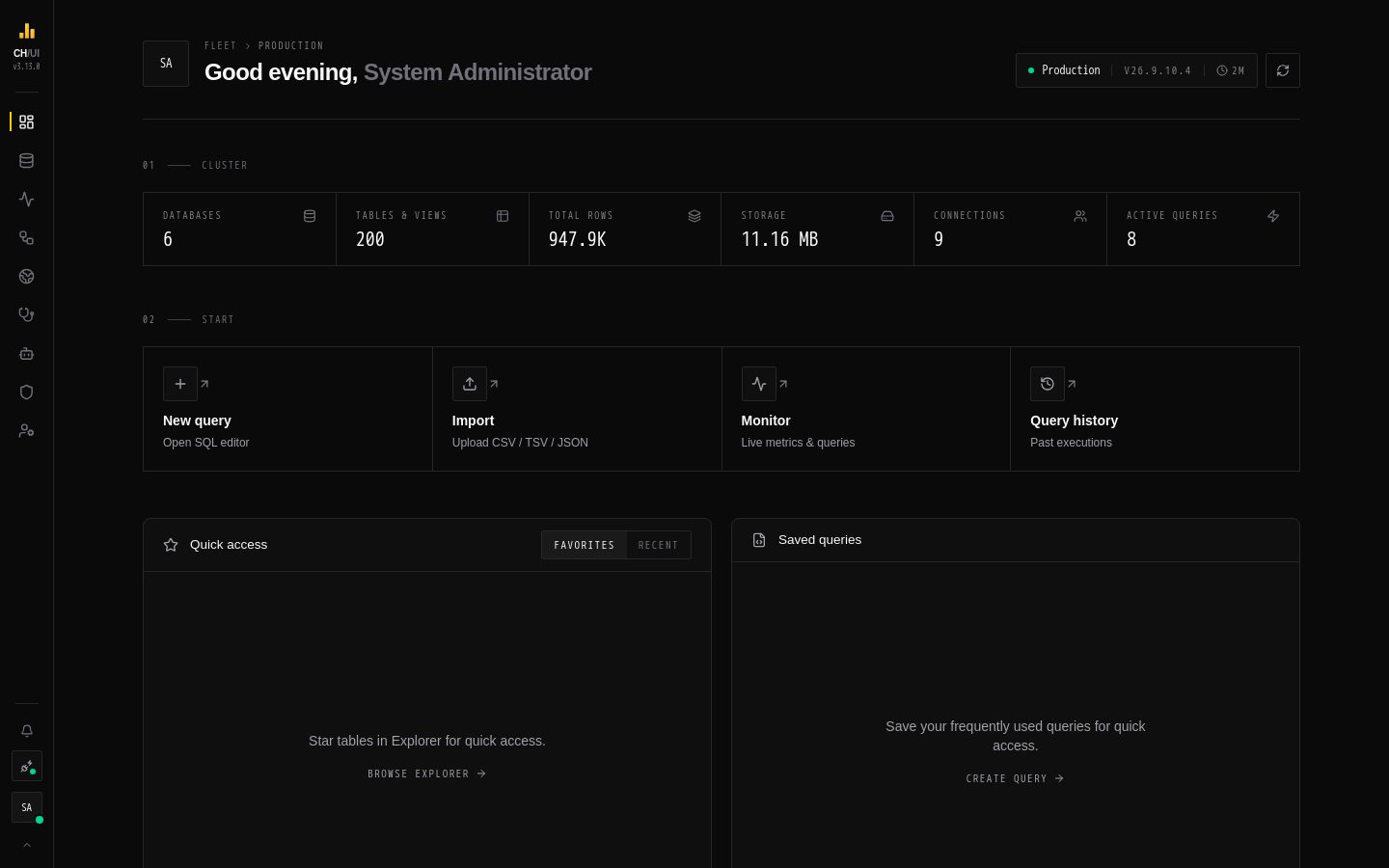
Home
Home
Per-connection landing page: system stats, saved queries, recent activity and quick actions.
- In the app
- Home
/overview
Home (/overview) is the starting page for the active connection: what you were working on, what you saved, and how the server is doing. Everyone who can sign in can open it.
Where you land after signing in
| You have | You land on |
|---|---|
connections:view | Fleet — every connection at once |
| Anything else | Home |
You can always switch with the dock.
What's on the screen
| Section | Shows |
|---|---|
| Continue working | Your unsaved query tabs — Open all to restore them in the Explorer |
| Quick access | Your favorites and recent tables |
| Saved queries | Queries you saved or that were shared with you (saved_queries:view) |
| Cluster metrics | Databases, tables & views, total rows, storage, connections and active queries |
| Quick actions | New query, Import (upload CSV / TSV / JSON), Monitor (live metrics and queries), Query history |
| Recent activity | Your latest query executions (query:history:view; everyone's with query:history:view:all) |
| ClickHouse resources | Links to the ClickHouse documentation, SQL reference and best practices |
Refresh all data reloads every panel.
Related
- Fleet — all connections side by side
- Monitoring — the full detail behind Cluster metrics
- Data overview — whether the data itself is right