
Harnesses
How DeepAgents runs an agent: which built-in tools it sees, the prompt suffix, the general-purpose subagent — and the three built-in harnesses.
- In the app
- AI Governance › Assistant › Harnesses
/ai/assistant - Needs any of
- ai_agents:viewai_agents:manage
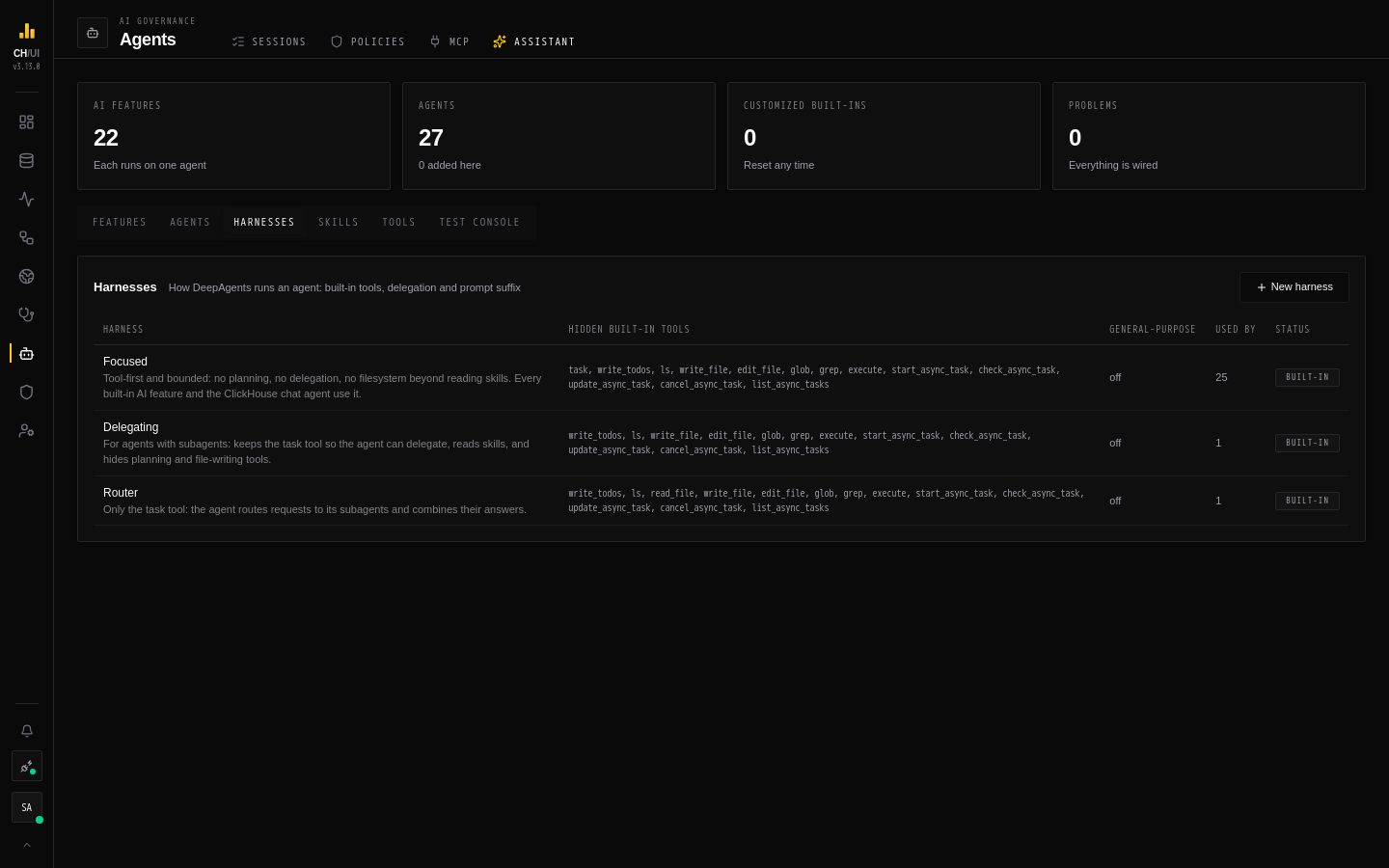
A harness decides how DeepAgents runs an agent. On top of the catalog tools you grant, DeepAgents gives every agent a set of built-in tools — delegating with task, planning with write_todos, reading files with read_file, and more. The harness chooses which of those the model sees, adds a fixed paragraph to the prompt, and can add a general-purpose helper subagent. Every agent names exactly one harness, and each agent in a tree uses its own.
Built-in harnesses
| Harness | Keeps | Use it for |
|---|---|---|
| Focused | read_file (to read skills) | Tool-first, bounded work with no planning or delegation. Every built-in feature agent, ClickHouse Data, and the three CHouse Admin specialists |
| Delegating | task, read_file | Agents with subagents that also use their own tools — CHouse Admin |
| Router | task | Agents that only route to subagents and combine their answers — CHouse Assistant |
Each also appends a prompt suffix. Focused tells the model to use its tools directly and not to plan or delegate; Delegating tells it to delegate focused sub-questions with full context, because subagents don't see the conversation. Router adds none — the router's own prompt carries its rules.
The AI tool catalog shows every built-in DeepAgents tool and which harness hides it.
Editing a harness
Open a harness from AI Governance › Assistant › Harnesses. A change applies to every agent that uses the harness, subagents included — check the agent list before you change a shared one, or create a new harness for one agent.
- Name, Slug and Description — the slug follows the same rules as agent slugs.
- Built-in tools — switch a tool off to hide it from the model. An agent with subagents needs
task; the server rejects a harness change that would taketaskaway from such an agent. - General-purpose subagent — when on, every agent using the harness gets an extra subagent named
general-purposethat has the agent's own tools and skills. It's DeepAgents' generic helper for context-heavy sub-tasks; you can replace its description and system prompt. Off in all built-in harnesses. - Prompt suffix — up to 4,000 characters, appended after the rest of the system prompt (after the output contract on feature agents).
- Tool description overrides — one per line as
tool_name: new description. Replaces the description the model reads for a built-in or catalog tool, for agents on this harness only. Use it to steer when a tool is used without touching the tool. - History — earlier versions, with Restore.
What a harness cannot do
The filesystem tools work on an in-memory scratch space that is discarded when the run ends; skills are mounted read-only under /skills/, and a write there is refused. execute needs a sandbox backend, which CHouse never provides, and the async-task tools are for remote subagents CHouse doesn't use — the built-in harnesses hide them all. Turning them on gives an agent nothing it could use to change your systems: catalog tools are the only way out of the run, and they are all read-only.
Built-ins, reset and delete
Editing a built-in harness marks it customized: CHouse upgrades stop changing it and show update available when a newer version ships. Reset to built-in restores the shipped definition. Built-in harnesses can't be deleted. A harness you added can be deleted once no agent uses it. See Versions, upgrades & audit.