
AI agents
Every AI feature and the chat run on an agent you can edit in AI Governance › Assistant: how features, agents, harnesses, skills and tools fit together.
- In the app
- AI Governance › Assistant
/ai/assistant - Needs any of
- ai_agents:viewai_agents:manage
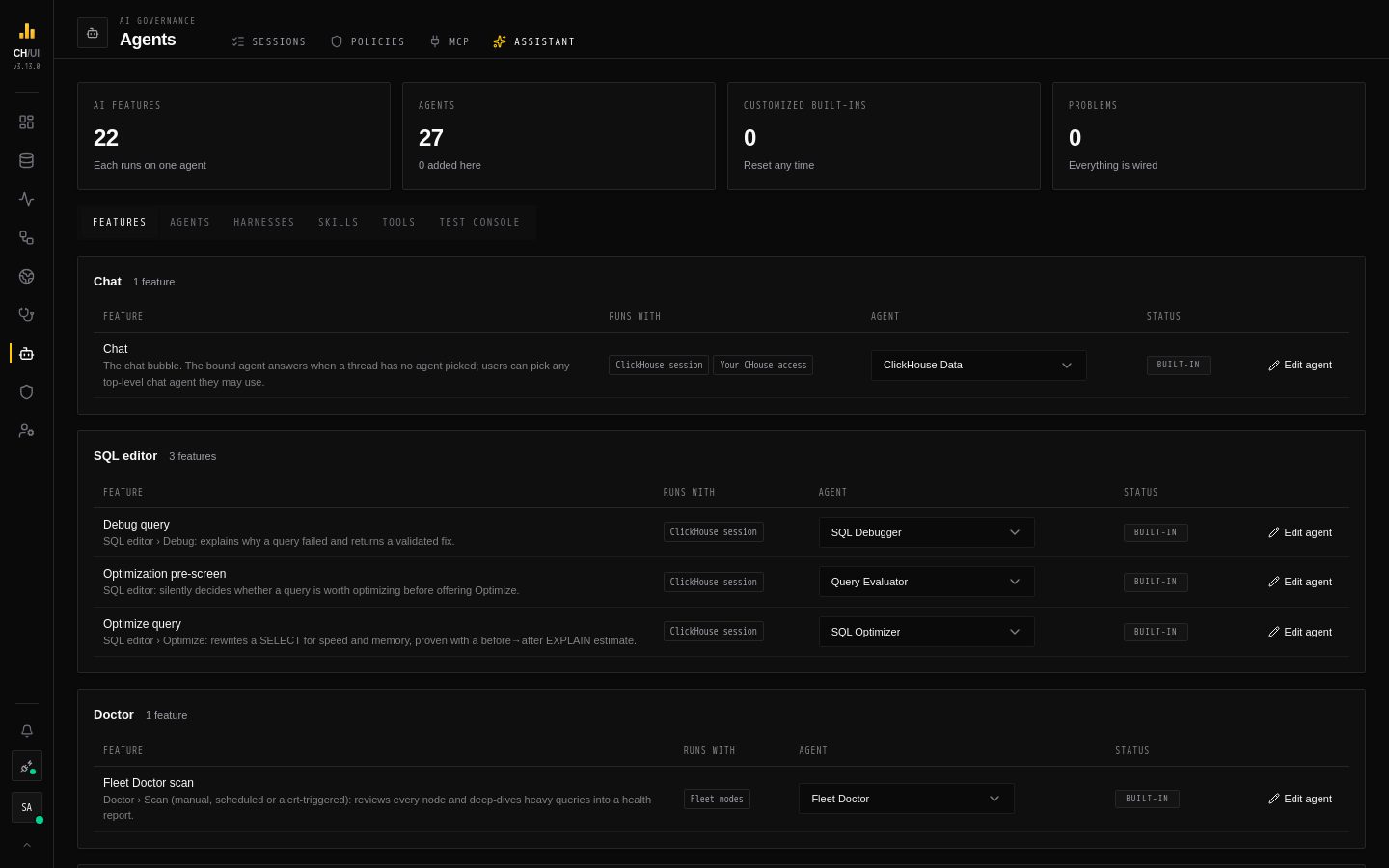
Every AI feature in CHouse UI runs on an agent you can see and change in AI Governance › Assistant: the chat, the SQL editor's Optimize and Debug, the Doctor scan, the diagnoses in Monitoring, and the DataOps and observability assistants. Nothing about an agent is hard-coded. CHouse ships built-in agents; you can edit them, add your own, rewire which agent a feature uses, and test a change before you save it.
How it fits together
| Part | What it is | Where it lives |
|---|---|---|
| Feature | A place in the product that calls the AI, such as Optimize query or Fleet Doctor scan. It decides who may call it, gathers the evidence, and checks the shape of the answer | Code — listed in the AI feature catalog |
| Binding | Which agent a feature runs on. One agent per feature | AI Governance › Assistant › Features |
| Agent | A system prompt, a task template, a model, tools, skills, subagents, a harness and tuning | AI Governance › Assistant › Agents — see Editing agents |
| Subagent | Another agent that a parent can hand a sub-task to | The parent's Subagents list |
| Harness | How DeepAgents runs an agent: which built-in tools it sees, a prompt suffix, an optional general-purpose subagent | AI Governance › Assistant › Harnesses — see Harnesses |
| Skill | A SKILL.md with reference files that an agent reads when it needs it, or that is pinned into its prompt | AI Governance › Assistant › Skills — see Skills |
| Tool | A read-only action an agent can call: query ClickHouse, read a node's system.* tables, read CHouse's own API as the user | Code — listed in the AI tool catalog |
The split is deliberate. What the product depends on — permissions, evidence, the output contract, what a tool does and as whom — stays in code, where it is reviewed and tested. What you tune — the wording, the model, which tools and skills an agent gets, how work is delegated — is data you manage in the UI.
What happens on a run
- The feature checks the user's permission (
ai:optimize,doctor:run, …) and gathers its evidence. - It looks up its bound agent. A missing, disabled or no-longer-fitting agent fails the run with an error that says what to fix; nothing falls back silently.
- The agent's prompt and task template are rendered with the feature's template variables, and pinned skills are appended.
- The agent tree is built: each agent with its own harness, its granted tools and its skills, and its subagents below it.
- The model runs, calling tools and delegating to subagents, within the agent's step budget and timeout.
- Structured features validate the answer against their JSON contract and finish the result in code (for example the before→after EXPLAIN estimate of Optimize).
Every tool call is recorded with the agent that made it, so the chat's activity panel and the test console show which agent did what.
Who can do what
| Permission | Allows | Default roles |
|---|---|---|
ai_agents:view | Open AI Governance › Assistant and read every agent, harness, skill, binding and its history | Super Admin, Admin |
ai_agents:manage | Create, edit, delete, rebind, reset, restore — and run the test console | Super Admin, Admin |
Using an AI feature keeps its own permission (ai:chat, ai:optimize, doctor:run, …); see the permission catalog. Agents can never do more than the person they run for: ClickHouse tools run on the user's connection with their data access rules, and CHouse tools call the API as that user.
The Assistant screen
The header shows four counters: the number of AI features, Agents (and how many you added), Customized built-ins (and how many have a CHouse update waiting), and Problems. Below it, six tabs:
| Tab | What it shows |
|---|---|
| Features | Every AI feature, grouped by where it appears, with the contexts its tools may use and its agent. Pick another agent to rebind it — see Rebinding a feature |
| Agents | A tree of routers and top-level agents with their subagents below. New agent, and Edit or View on each row |
| Harnesses | The built-in and custom harnesses |
| Skills | Every skill with its files |
| Tools | The read-only tool catalog: what each tool does, the context it needs, the permissions it needs and which agents use it |
| Test console | Run any feature or chat agent as you, on your active connection |
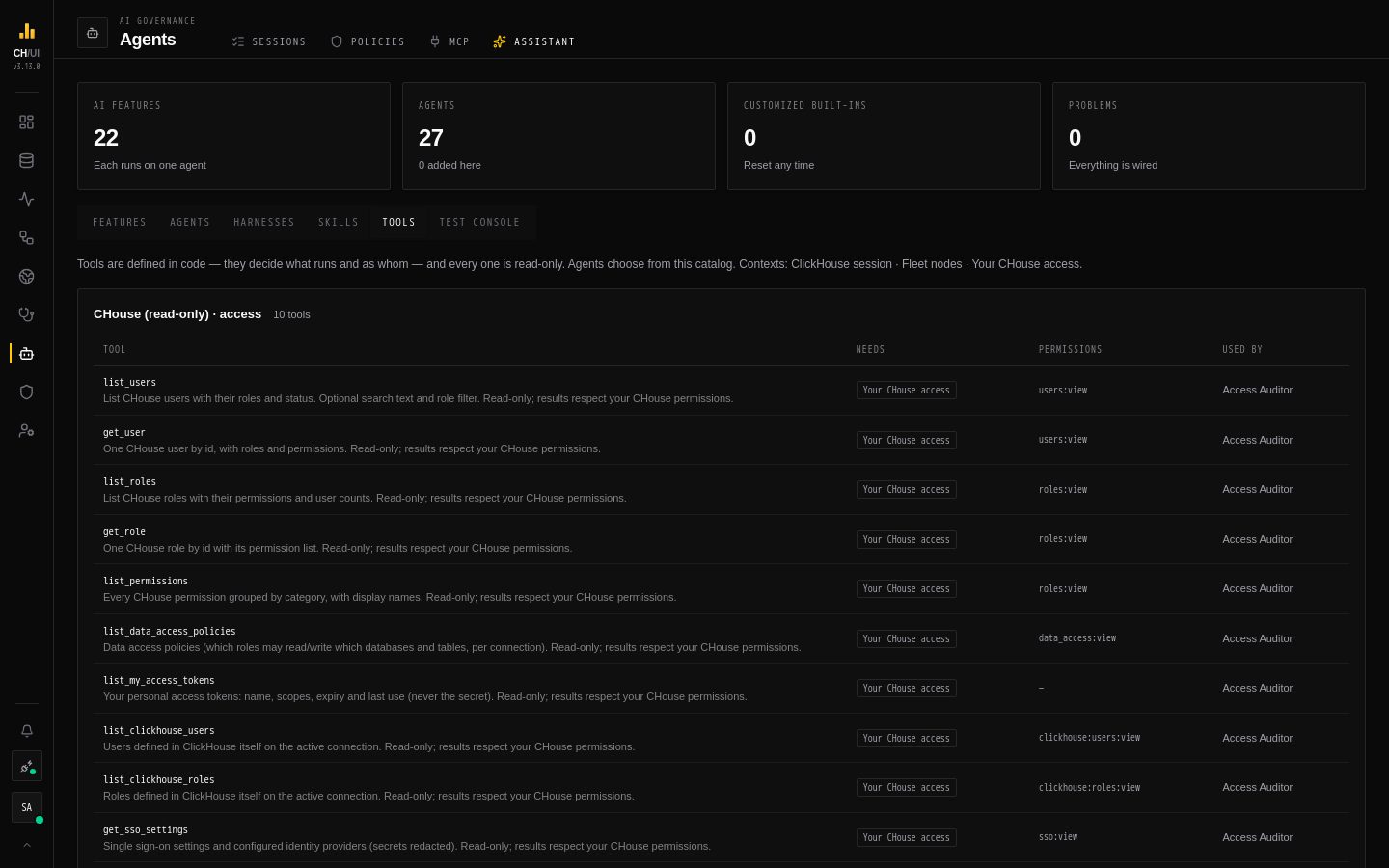 Tools: the read-only catalog, with the context and permissions each tool needs
Problems
The registry is checked as a whole after every change. The Problems panel lists everything that would stop a feature from running: a feature with no agent, an agent that is disabled, a tool the feature's context can't serve, a template that uses a variable the feature doesn't provide, a skill reference that doesn't resolve, a subagent cycle. A save that would add a problem is rejected with the list; problems that already existed never block an unrelated edit.
Rebinding a feature
In Features, the agent menu offers only agents that fit the feature:
- the Chat feature takes a chat agent (an agent with no task template); every other feature takes a feature agent (one with a task template)
- every tool in the agent's whole tree must run in a context the feature provides — a fleet agent using
query_nodecan't serve a SQL-editor feature that only has a ClickHouse session - the agent must be enabled
The server checks again on save, including the agent's templates against the feature's variables. To try a new agent on a feature without touching the live one, Duplicate the bound agent, change the copy, test it in the test console, then rebind. Every rebinding is versioned and audited — see Versions, upgrades & audit.
Models and limits
An agent can name its own model; empty means the default model from AI models. A model the user picks in the chat or the SQL editor wins over the agent's model, and a subagent without its own model uses its parent's.
The per-model runtime parameters set in AI models — recursion limit and run timeout — win over an agent's tuning. When a run stops with "The AI agent hit its step limit", raise the agent's step budget or recursion limit, or that model's parameter. See Settings.
In this section
- Editing agents — the editor, tools, skills, subagents and settings
- Prompt templates — variables, sections, skill includes and the preview
- Harnesses — how an agent is run, and the three built-in harnesses
- Skills — on-demand and pinned instructions, and writing your own
- Chat agents — the agent picker, the router and CHouse Admin
- Test console — try a feature, an agent or an unsaved draft
- Versions, upgrades & audit — history, restore, built-in updates and the audit trail
- Reference: AI feature catalog and AI tool catalog
- Guides: Customize an AI feature and Build a chat agent