
AI guardrails
Redact PII and secrets, cap results, stop runaway agents, refuse unsafe SQL and judge requests — in every AI run and MCP result, with shadow mode.
- In the app
- AI Governance › Guardrails
/ai/guardrails - Needs any of
- ai_guardrails:viewai_guardrails:manage
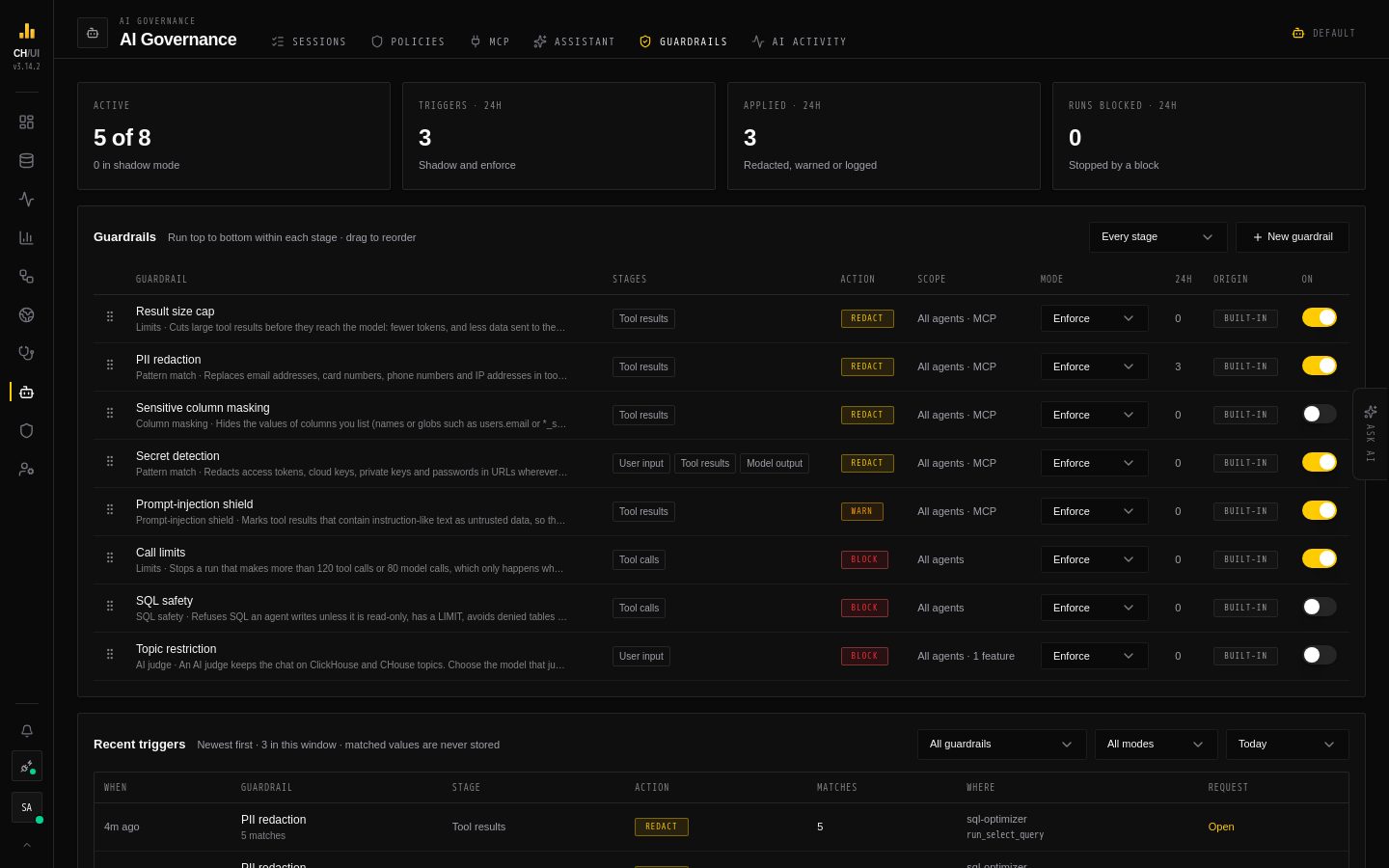
AI Governance › Guardrails (/ai/guardrails) controls what passes through every run of CHouse's own AI — the chat and every AI feature, with all their agents and subagents — and, where you turn it on, every result an MCP agent gets back. A guardrail can hide personal data and secrets before they reach the LLM provider, cut oversized results, stop a runaway agent, refuse unsafe SQL, or block a request that breaks a rule.
Guardrails are built from shipped kinds: you choose a kind and configure it, and never write code that runs on the server.
Who sees what
| Permission | Can |
|---|---|
ai_guardrails:view | See guardrails and their triggers. Admin and Super Admin have it |
ai_guardrails:manage | Create, edit, reorder, switch, reset and delete guardrails. Admin and Super Admin have it |
Drafting a guardrail with AI also needs ai:optimize.
How a run passes through them
| Stage | What a guardrail sees |
|---|---|
| User input | What the user typed, or the task of an AI feature, before the first model call |
| Tool calls | The tool and its arguments before the tool runs, and model call counts |
| Tool results | What a tool returns, before the model sees it, and the data an AI feature gathers before its agent starts (Data Health samples, query history, a fleet overview). JSON is rewritten value by value and stays valid JSON. Limits apply to tool results only |
| Model output | The model's answer |
When an AI feature's answer doesn't parse, CHouse asks the model once more to format it. That call gets the same input and output guardrails as the agent.
Within a stage, guardrails run top to bottom in the list, each seeing the previous one's output. Drag a row to change the order.
| Action | What happens on a match |
|---|---|
log | Recorded in the triggers list only |
warn | Recorded, and the model is told: a tool result is marked as untrusted data, or a flagged tool call's reason is sent with its result |
redact | Matches are replaced before anything reaches the provider; a size limit cuts the result |
block | The run stops and the user sees Blocked by guardrail … |
Shadow mode runs a guardrail and records what it would have done, without changing anything. New guardrails start in shadow mode; switch one to Enforce from its row once its triggers look right.
Fail closed. If a guardrail cannot run — an AI judge's model is unavailable, or a single value is larger than 1 MB — the run stops instead of continuing without it.
Kinds
| Kind | Stages | What it checks |
|---|---|---|
| Pattern match | All | Your regexes plus built-in detectors: email, card numbers (Luhn-checked), phone numbers, IP addresses, URLs, and secrets (AWS keys, CHouse tokens, JWTs, private keys, passwords in URLs, bearer tokens) |
| Keyword list | Input, tool results, output | Whole-word terms, case-insensitive |
| Column masking | Tool results | Values of columns you list, by name or glob (email, *_ssn). Results rarely say the table, so users.email also matches a bare email column |
| Prompt-injection shield | Tool results | Text in a result that reads like instructions to the model, such as "ignore the previous instructions" |
| SQL safety | Tool calls | Read-only SELECT only, a LIMIT on row-returning queries, denied databases and tables, and a ceiling on the rows EXPLAIN ESTIMATE predicts for tools on your connection |
| Tool policy | Tool calls | Never allow a tool, allow it N times per run, or only for users with a permission |
| Limits | Tool calls, tool results | Tool calls and model calls per run; rows and bytes per tool result |
| AI judge | Input, output | A model you choose checks text against a plain-language rule. Each check is a model call, with its tokens in AI activity |
Redaction replaces a match with a placeholder ([EMAIL]), a mask (da•••) or a hash ([EMAIL:3f9a1c20], the same value always gives the same hash within a run, so the model can still tell values apart). Regexes with nested repeats such as (a+)+ are refused when you save: they could stall every run.
Built-in guardrails
| Guardrail | Kind | On by default |
|---|---|---|
| Result size cap | Limits: 1,000 rows and 256 KB per tool result | Yes |
| PII redaction | Pattern: email, card, phone and IP in tool results | Yes |
| Sensitive column masking | Column masking: add your columns, then enable it | No |
| Secret detection | Pattern: secret detectors on input, tool results and output | Yes |
| Prompt-injection shield | Marks instruction-like tool results as untrusted (warn) | Yes |
| Call limits | 120 tool calls and 80 model calls per run | Yes |
| SQL safety | Read-only, LIMIT, under 1 billion estimated rows | No |
| Topic restriction | AI judge keeping the chat on ClickHouse and CHouse; choose its model, then enable it | No |
All but Call limits, SQL safety and Topic restriction also apply to MCP tool results. Editing a built-in guardrail's settings marks it customized, so upgrades stop changing it; Reset to built-in brings the shipped version back. Switching it on or off, its mode and its position are yours and never count as customizing.
Creating a guardrail
New guardrail opens four steps:
- Kind — pick one, or describe what you want ("mask employee IDs like EMP-123456 in query results") and Draft: Chouse AI picks the kind and fills in the settings. Nothing is saved; anything the draft gets wrong is listed for you to fix.
- Configure — the name and the kind's settings.
- Scope and action — the stages, the action, which agents and AI features it applies to, and whether it also covers MCP tool results.
- Test and save — run it on sample text and see exactly what the model would get, then save in shadow or enforce mode.
Open any guardrail to edit it, test it, restore an earlier version from its history, reset it (built-in) or delete it (custom). Changes apply from the next AI run, on every server.
Triggers
Recent triggers lists every match: the guardrail, stage, action and mode, how many values matched, the agent and tool, and a link to the AI request. Matched values are never stored, only counts and where they happened. Triggers are kept as long as AI activity (AI_USAGE_RETENTION_DAYS). A row in AI Governance › Assistant › Agents shows how many guardrails apply to that agent.
Chat, MCP and the CLI
Ask the chat — "which guardrails are in shadow mode?", "what did guardrails catch today?" — and CHouse Admin's Platform Auditor answers with the list_ai_guardrails and list_ai_guardrail_triggers tools, which any agent of yours can be granted in AI Governance › Assistant (see the tool catalog). MCP agents get the same two tools, and the CLI has chouse ai guardrails and chouse ai guardrail-triggers. Both are read-only: guardrails are changed in the UI or the REST API (/api/ai-guardrails).