
Using the chat
Live steps, Stop, files and skills with a message, changes with Undo, plans and approvals, memory notes, hand off and budgets in the chat.
- In the app
- Chobi › Chat
- Needs
- ai:chat
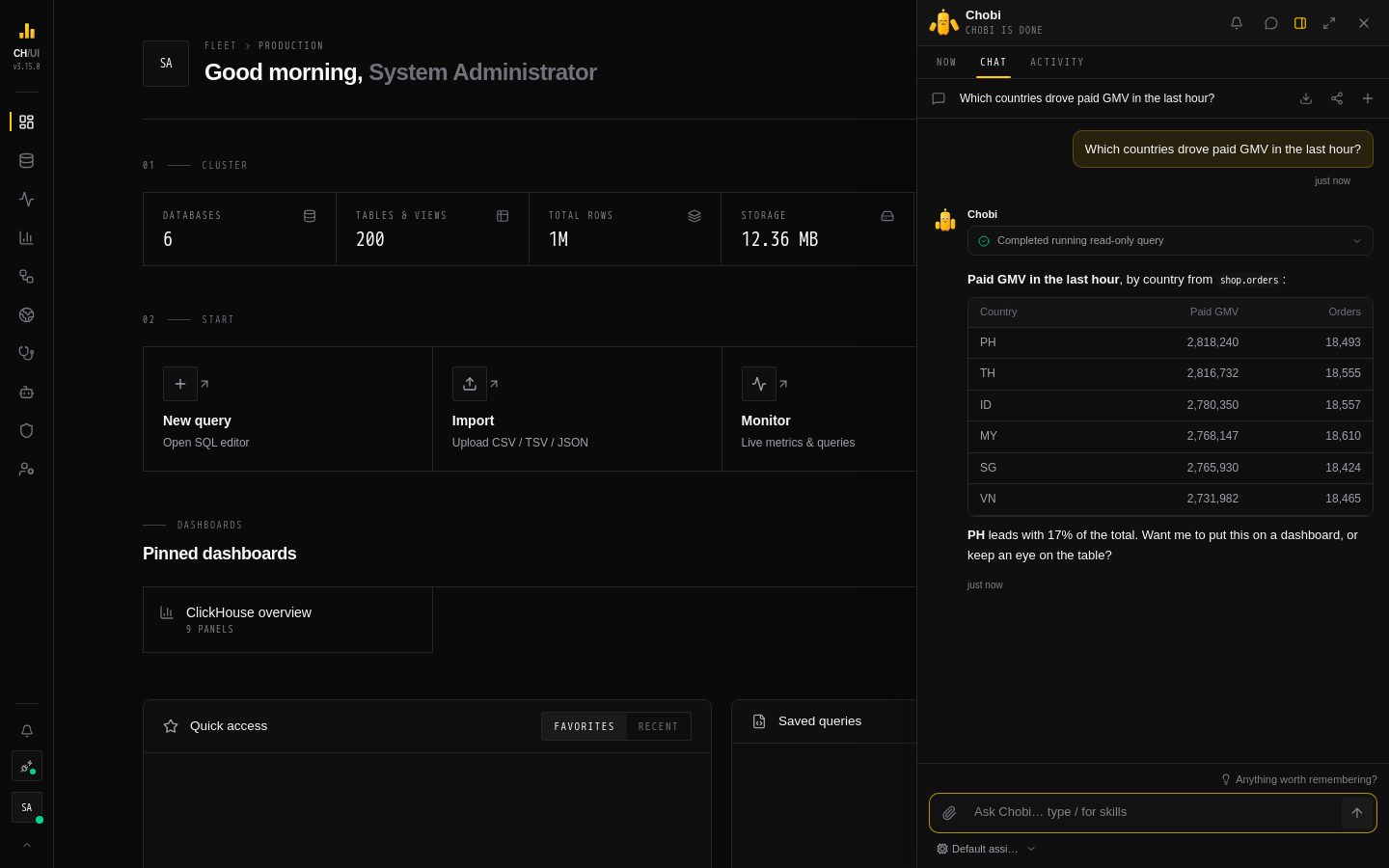
The chat lives in Chobi, the CHouse buddy, and talks to CHouse Assistant by default. This page covers what you see while it works: live steps, stopping, files and skills you send with a message, the changes it makes for you, and the notes it keeps.
Live steps
A reply shows each tool call as it starts and ends: Checking available databases, Running read-only query, and so on, with a summary such as 6 databases or 120 rows. The activity panel is open while the reply is worked on; a step that failed stays visible. When the answer is ready the panel collapses to a one-line summary you can open again.
The final answer appears once it is complete, after the output guardrails have checked it, so you never see text that a guardrail would have removed.
Stop ends the reply on the server, not only in your browser. Closing Chobi, switching threads or reloading the page does not: the reply keeps going, and reopening the thread picks it up where it is, steps included. A reply that is still running when its server stops is marked failed after two minutes.
Files
Click the paperclip, or drop files on the chat, to send up to 3 files with a message, 5 MB each:
| File | What the model gets |
|---|---|
.csv, .tsv, .txt, .log, .md, .json, .sql | The text, after the input guardrails |
| Images (PNG, JPEG, WebP, GIF) | The image, when the model accepts images |
| The document, when the model accepts PDFs |
Which models accept images and PDFs is set per provider model in AI models. Images and PDFs are not scanned by guardrails. The thread keeps the file names, not the files; AI activity records what was sent.
Questions you ask from elsewhere — a selection, an editor query, an item you drop on Chobi — arrive the same way, as a text file with the message.
Skills
Type / in the message box to pick one of the agent's skills, or write /skill:name. The skill's instructions go to the agent with that message only, as if it had read the skill first. Chips above the box show the skills and files that go with the next message.
Changes
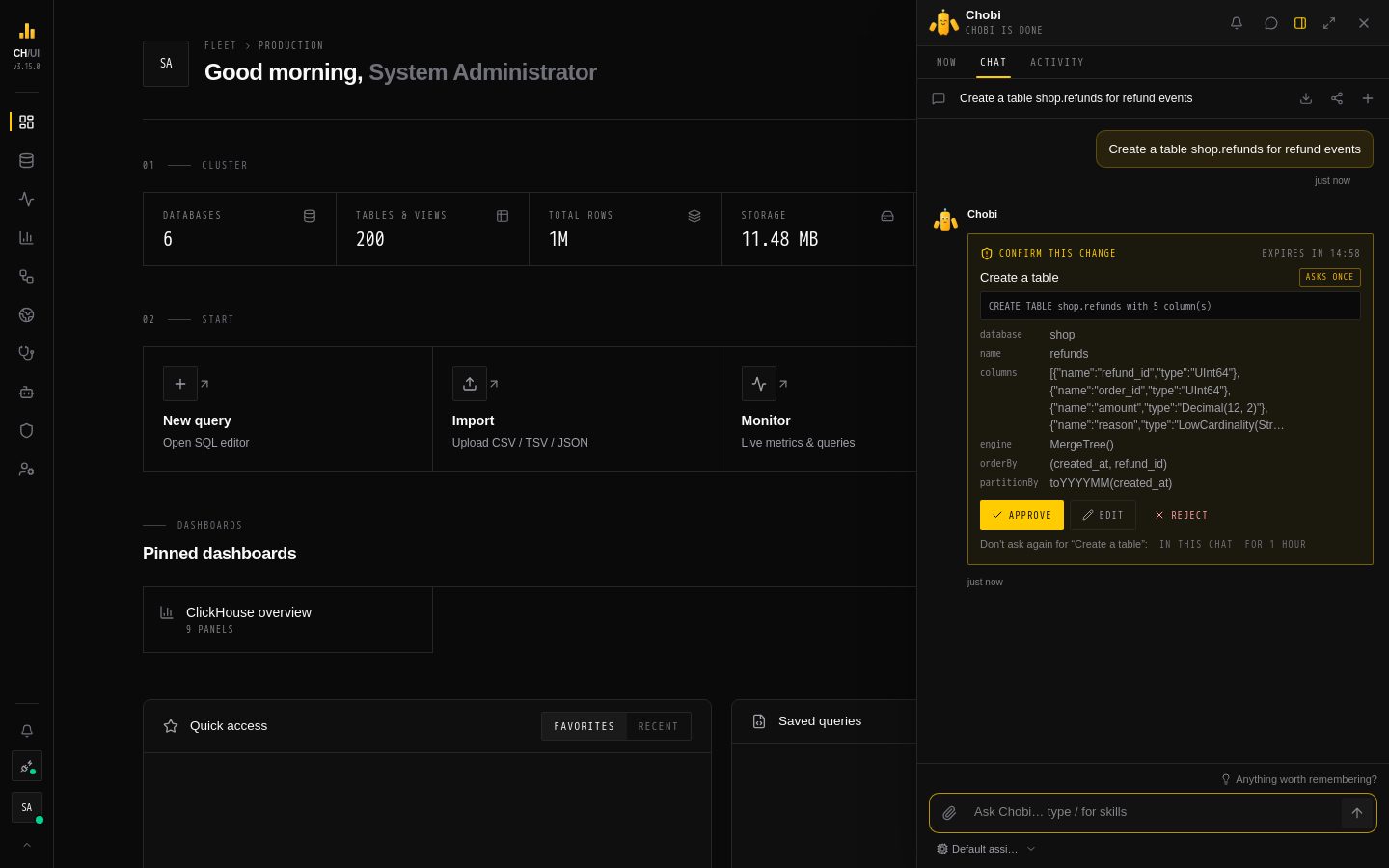 A change that asks once pauses the reply until you approve, edit or reject it
CHouse Assistant can change things for you with write tools. How much you are asked depends on the change's tier:
- Undoable changes run at once. The reply shows a Done receipt with Undo for 24 hours.
- A change that asks once pauses the reply on an Approval needed card that says exactly what will happen. Approve runs it as you; Edit changes the arguments (as JSON) first; Reject tells the agent no, with an optional reason. In this chat or For 1 hour allows that tool without asking again — except right after the agent read data people wrote, when it asks anyway.
- Two or more changes at once pause together as a plan: Run plan or Cancel plan.
- A second-approver change is filed in Approvals and the reply goes on; its receipt says it is waiting for someone.
Approving needs the ai:act permission (Admin and Developer have it); anyone can reject. A card waits 15 minutes; after that the reply stops and you ask again. Sending a new message instead of answering declines the change. Every decision is in the audit log and in AI Governance › Approvals.
Memory
When the agent has memory turned on, it remembers lasting preferences you state (always use UTC) and the reply shows Saved to your memory with Undo. Knowledge about a connection that helps your team is only proposed until an admin approves it. See Memory.
Hand off
Hand off in the chat's header turns the conversation into a note for whoever picks it up — what was asked, where it landed and what changed — built from the thread itself. Add it to an open incident's notebook, download it as Markdown, copy it, or post a short summary to an alert channel. See Chobi › Hand off.
Budgets
An administrator can cap what the chat spends per day or month. A used-up budget either stops the chat until it resets, with the reset time in the message, or switches it to a cheaper model. See Budgets.